Oh, the Comfort of a File That Already Knows You
Set Up CLAUDE.md and Go from Idea to Working MVP in One Session


On the cover: Jan Steen's Self-Portrait as a Lutenist (c. 1660-63), paired with Craik on the comfort of being known without having to explain. Picked because CLAUDE.md is the file that lets Claude Code recognize you on sight, the same way Steen wanted the viewer to recognize him in costume.
"Oh, the comfort, the inexpressible comfort of feeling safe with a person; having neither to weigh thoughts nor measure words, but to pour them all out, just as they are, chaff and grain together, knowing that a faithful hand will take and sift them, keep what is worth keeping, and then, with a breath of kindness, blow the rest away." Dinah Maria Mulock Craik, A Life for a Life

Steen painted himself more than thirty times across his career, casting himself as a drunk, a doctor, a flirt, the host of a chaotic feast. The Steen above is one of his lighter masks. He sits with a lute across his lap, head tilted back, mouth open in a full open laugh. A pewter tankard rests on the table beside him. A folded sheet of paper waits at his elbow. The brim of his hat throws a half-shadow across his eyes, and the curtain behind him reads almost like the wing of a stage. He looks like he expects you to know him.
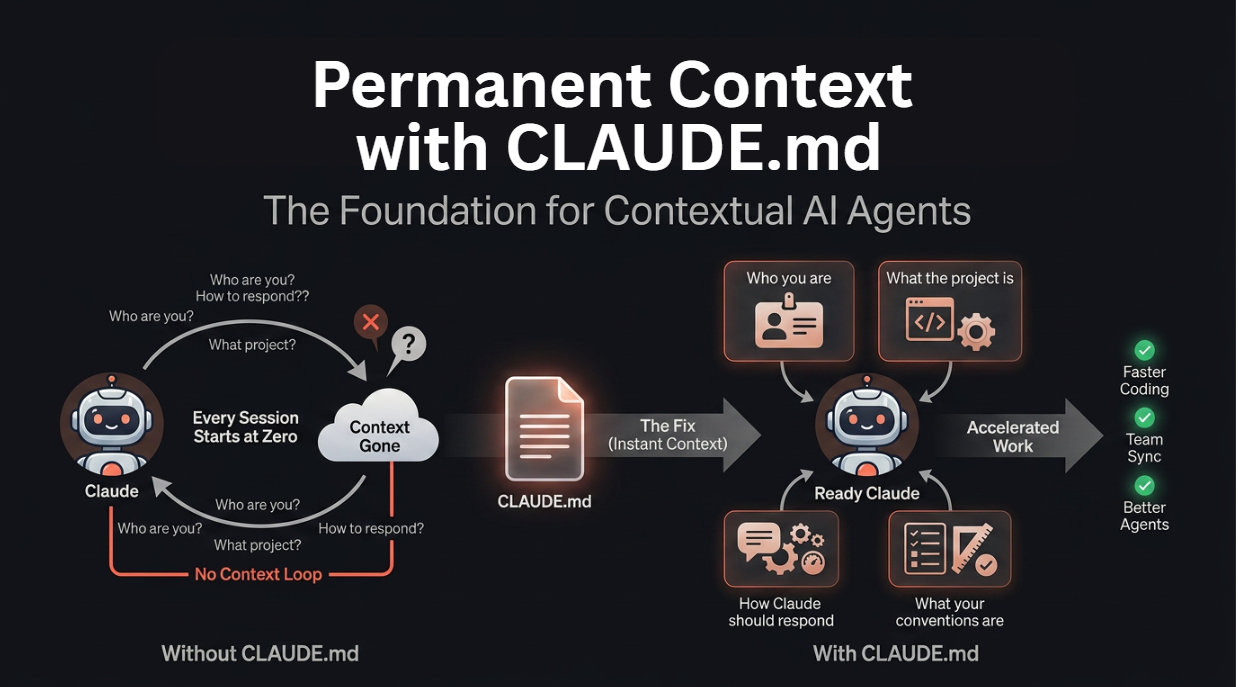
CLAUDE.md is the file that lets Claude Code know you the same way before you've said anything. You write it once, in plain English. It sits in the root of your project, and from that moment on every new session opens with Claude already aware of who you are, what you're building, and how you like to work. The "inexpressible comfort" Craik wrote about, pouring out chaff and grain together knowing a faithful hand will sift them, is the day-to-day experience of working with Claude Code once that file is in place.
Most people's first weeks without it are the opposite of that. They open a session, describe their project from scratch, get a sharp first response, and close the laptop feeling like they've found a superpower. The next day they fire it back up, the panel is blank, and everything from yesterday is gone. They describe the project again, in slightly worse words this time, and the session never quite recovers. The students who ship the most with Claude Code spend twenty minutes on CLAUDE.md and then almost never think about it again. The ones who struggle are usually the ones who skipped it.
Don't skip it.
In This Chapter
- 2.1 Why Most AI Sessions Fail Before They Start
- 2.2 CLAUDE.md: The Most Important File You Will Ever Write
- 2.3 The Four Questions Every CLAUDE.md Must Answer
- 2.4 Live Demo: Writing CLAUDE.md from Scratch
- 2.5 Testing That It Works
- 2.6 The PRD Generator: From Feature Idea to Full Spec in 20 Minutes
- 2.7 The User Story Writer: From Spec to Sprint-Ready Stories
- 2.8 Live Build: Meeting Notes Summarizer
- 2.9 From Idea to MVP: The Full Workflow
- 2.10 Chapter Assignments
- 2.11 Prompts Worth Saving
- Summary
2.1 Why Most AI Sessions Fail Before They Start
You've probably watched this happen to someone. They try Claude Code for the first time, ask it to build something specific, and the demo is sharp, good clarifying questions, code that actually runs, the impression that they've finally found the AI tool that works. Then they close the session, think "neat," and never come back. A week later you'll ask if they're still using it. They aren't.
What killed the habit is almost always the second session, not the first. The second session felt useless compared to the first. Claude asked things it should already have known. It made suggestions that didn't fit the project. The user pattern-matched the experience to every other AI tool they've tried, promising once, mediocre forever, and walked away. The actual problem isn't that Claude Code stopped working. The problem is that Claude Code starts every session with no memory of the project. Every session is a stranger walking into your office for the first time, and you're explaining the company from scratch.
For PM work this matters more than for almost any other use case. PM work happens across sessions, not inside one. You start a PRD on Monday, refine it on Wednesday, hand pieces of it off on Friday, come back to it the next sprint. Without persistent context, every one of those touch-points starts as a tutorial about your project rather than actual work on it. The cost is invisible and constant.
What rescues this is the realization that you don't need Claude to remember everything about your project. You need it to remember the small set of things that actually shape its responses: your role, what you're building, how you like to work, your tech stack, the rules that keep coming up. That's the slice of context that pays for itself in every session. Everything else can be discovered on the fly. That small slice is what CLAUDE.md captures.
2.2 CLAUDE.md: The Most Important File You Will Ever Write
CLAUDE.md is a plain text file that Claude Code reads automatically at the start of every session. That's the whole mechanism. There are no plugins to install, no settings to configure, no signup screens. You drop a file called CLAUDE.md in the root of your project, and Claude Code finds it.
You write it once. From that point forward, every new Claude Code session opens with that file already in context. Claude knows who you are, knows what you're working on, knows how you like things done. Every instruction you type lands inside that context instead of against a blank slate. Think of it as a permanent briefing memo pinned to your office wall: every time Claude walks in, it reads the memo and gets oriented before you've said a word.
The most useful thing to internalize about CLAUDE.md is that it doesn't need to be perfect. A rough first version beats the polished version you never finish writing. The honest workflow is: write something basic, work with Claude Code for a few sessions, notice the moments where it asked something it should already have known, and update the file. Start a new session. The feedback loop is instant. Most students write their first CLAUDE.md in fifteen minutes, update it by day three based on real usage, and by the end of the course they have something actually useful, not a template they filled out, but a file that has earned every line by being there when Claude needed it.
Why teams skip this and regret it:
Every PM who skips CLAUDE.md and dives straight into asking Claude Code for things ends up spending most of their time correcting Claude. "That's not what I meant." "We use React, not Vue." "I need this as a PRD, not a proposal." Those corrections aren't Claude failing, they're Claude guessing in the absence of context, the same way a new contractor guesses on day one. Twenty minutes spent on a halfway-decent CLAUDE.md collapses almost all of that correction time. The PMs who do it spend almost zero session time on context-setting and almost all of it on actual work.
2.3 The Four Questions Every CLAUDE.md Must Answer
There are four questions to answer when you write your CLAUDE.md, and the file should be roughly as long as it takes to answer them well. Don't write essays. A paragraph or two per question is plenty.
Question 1: Who Are You?
Your role, what you're responsible for, what you care about, what you already know. The point of this section is to tell Claude who it's talking to.
A bad answer is "I'm a product manager." That's a job title; it doesn't tell Claude anything actionable.
A good answer reads more like: "I'm a product manager at a B2B SaaS company. I've been here three years. I own the roadmap and customer relationships. I know backend and APIs but not deep frontend. I care about shipping fast over shipping perfect. I hate unnecessary complexity." That version tells Claude to skip backend explanations you don't need, lean into frontend ones you do, and weight its suggestions toward speed and simplicity. It changes the tone of the rest of the session.
Question 2: What Is the Project?
One sentence or two. What does it do? Who uses it? What state is it in right now?
A bad answer is "An AI tool." That's the level of detail you'd give a stranger at a conference; it isn't enough for Claude to be useful.
A good answer reads: "Clarity is an AI meeting notes tool. Companies use it to summarize Zoom calls and send action items to Slack. MVP is done, about 200 users, raising a Series A in three months." Now Claude knows what problem it's solving, what stage you're at, and what pressures shape your decisions. That changes how it prioritizes everything from architecture recommendations to copy suggestions.
Question 3: How Should Claude Respond?
Detail level, tone, what it should decide on its own versus what it should ask you about. This is the section that saves you the most back-and-forth.
A bad answer is "Be helpful." Everyone is trying to be helpful; the question is how.
A good answer reads: "Keep responses brief unless I ask for more. Use bullets instead of paragraphs. When you're unsure, ask instead of guessing. Don't add features I didn't ask for. If you hit an obvious error, fix it without asking." Each line in that paragraph removes a class of friction. The shorter outputs and the no-extra-features rule alone usually pay back the entire setup cost.
Question 4: What Are Your Conventions?
File naming, code style, how you like PRDs structured, any standing rules the team or project has. This is the section that stops Claude from writing things you'd have to rewrite.
A bad answer is "Standard conventions." Nobody knows what those are.
A good answer reads: "User stories use Gherkin format (Given/When/Then). PRDs start with the problem, not the solution. No API keys in commits. Feature branches: feature/name-initials (feature/analytics-yf). Tests required for backend changes." Each rule is small. Together they save hours that you would otherwise spend on the second draft.
Deeper read: Context Engineering for Claude Code: Mastering Deep Technical Knowledge, Thomas Landgraf (Substack)
CLAUDE.md is the smallest possible piece of "context engineering." This piece zooms out and shows what the same principles look like at production scale: priming context with knowledge files, referencing working code, treating context as a feature you actively maintain.
2.4 Live Demo: Writing CLAUDE.md from Scratch
Let's actually walk through this together. The trick most people miss is that you don't have to write CLAUDE.md by hand. Claude Code itself is excellent at generating it, as long as you give it the right opening.
Step 1: Clone the Course Repo
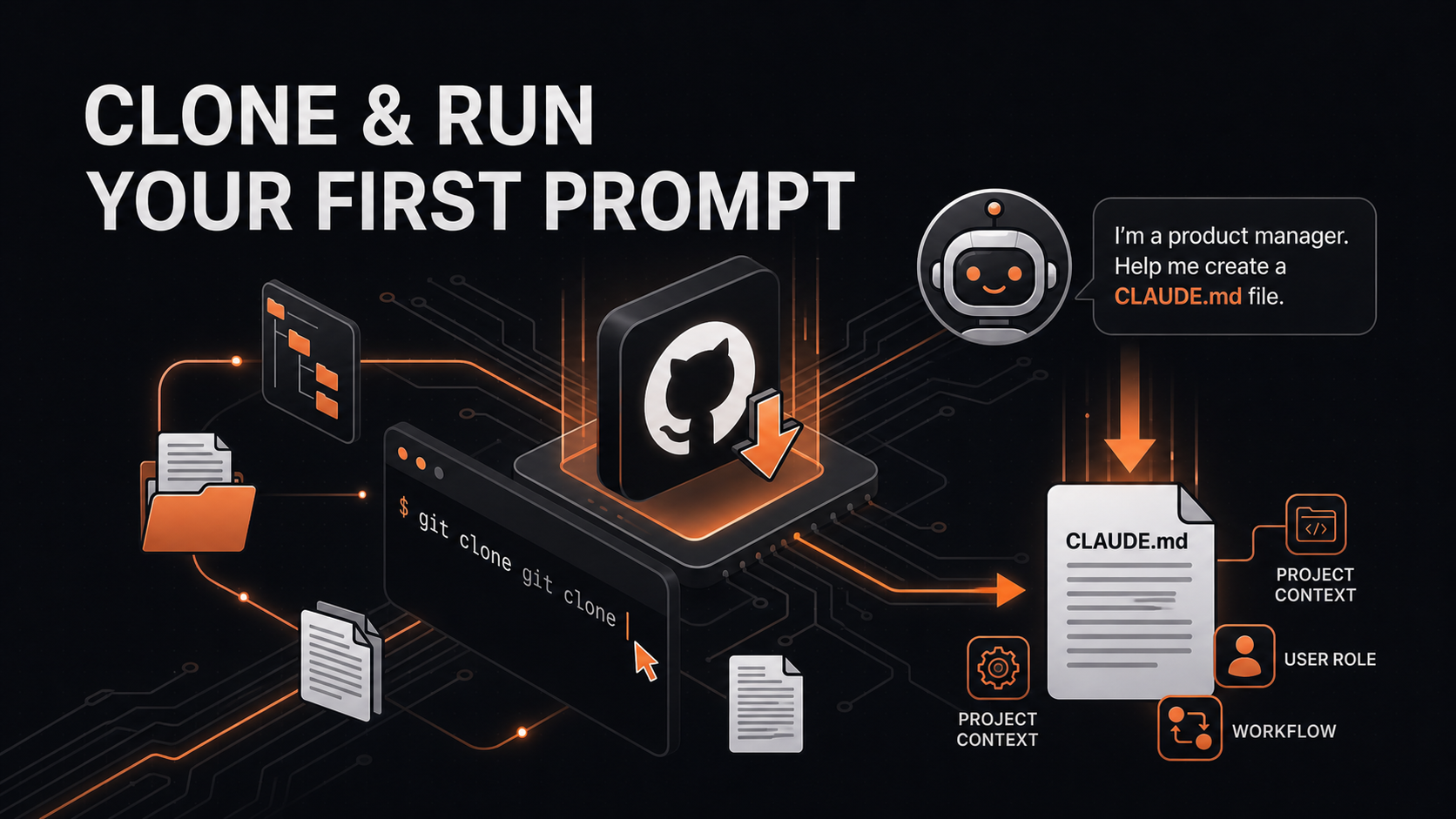
In VS Code, open the command palette (Cmd+Shift+P on Mac, Ctrl+Shift+P on Windows). Type Git: Clone and pick the option that appears. Paste this URL into the prompt:
https://github.com/hamzafarooq/claude-code-starter.git
Pick a destination folder on your machine. When VS Code asks whether to open the cloned repo, click "Open." Then go to File → Open Folder and navigate into claude-code-starter/.
Inside that folder you'll find CLAUDE.md, a starter file with everything we cover next. You have two paths from here. You can either let Claude generate yours from scratch using the prompt below, or use the file already present in the folder. Both work. The interview approach tends to surface things you wouldn't have thought to write.
Step 2: Open the Claude Code Chat Panel
Click the Claude Code icon in the VS Code sidebar, the one Anthropic's extension added during install. The chat panel opens on the right side of your editor and you're ready to type.
Step 3: Ask Claude to Interview You
Paste this prompt:
I'm a product manager. Help me create a CLAUDE.md file for my project.
Ask me the questions you need to write a good one.
Press Enter. Claude will start asking questions, about your role, the project, your tech stack, your working preferences, any standing rules. Answer them honestly. There are no right answers, only accurate ones. The better you answer, the more useful the file Claude builds for you.
The kinds of questions to expect:
- What is your role and background?
- What project are you working on?
- What's your tech stack?
- What are your working preferences?
- Any standing rules or conventions?
Once you've answered, Claude writes the CLAUDE.md file directly into your project folder. You'll see it appear in the file tree.
Step 4: Review What Claude Generated
Open the file and read it as if you'd never seen it. Does it sound like you? Does it capture what actually matters about how you work? If something is off, edit the file by hand, start a new Claude Code session, and verify that Claude is reading the updated version. This describe-build-review-edit loop is the pattern you'll use for nearly everything else in this book.
2.5 Testing That It Works
Once your CLAUDE.md is written, the next move is to confirm Claude is actually using it. Three quick tests do the job.
The Verification Question
Start a fresh Claude Code session in the same folder and ask:
What do you know about this project based on what you've read?
Claude should give you back a paragraph that accurately describes your project, your role, and how you like to work. If anything in the answer is wrong or thin, open CLAUDE.md, fix the relevant section, start a new session, and ask again. The feedback loop is instant and it costs you nothing to iterate.
The Refinement Question
Once the basic context is landing correctly, ask Claude what's missing:
Read my CLAUDE.md. What context would help you work better on this
project that is currently missing?
Claude almost always spots two or three things you didn't think to include, team size, deployment environment, specific pain points, edge cases that come up often. Add the suggestions that actually matter to your work. Ignore the ones that don't. The goal is a file that earns its keep, not a file that has everything.
The Reality Check
After your first five real Claude Code sessions, come back to CLAUDE.md and read it again. The question to hold in your head: where did Claude misunderstand me this week, and what context would have prevented that? Update accordingly. The first version of your CLAUDE.md will never be perfect, and that's fine. It is much, much better than no version at all, and it gets better every time you touch it.
Community signal, r/ClaudeAI: Why does this CLAUDE.md file have so many stars?
A 200+ comment dissection of what makes a CLAUDE.md actually useful, by people who've shipped real products. Skim it after you've written your first one. Free second opinion.
2.6 The PRD Generator: From Feature Idea to Full Spec in 20 Minutes
Most teams spend two weeks writing a PRD. There's a draft, then a meeting, then revisions, then another meeting, then a final draft that's already starting to drift from what the market needs. By the time the spec lands, half the details have rotated underneath it.
Claude Code can generate a structured PRD from a rough feature idea in roughly twenty minutes. Not a perfect one, a defensible one. Good enough to share with the team, get sharper feedback, and iterate from a real artifact instead of a blank page.
What the PRD Generator Does
The PRD Generator is a Skill. A Skill is a pre-written prompt that you trigger by name, instead of typing five hundred words every time you want a PRD, you type /prd-generator and Claude runs the whole interview for you. Skills are covered in depth in Chapter 4; for now, all you need to know is that /prd-generator is one and it's already wired up inside the course repo.
When you run it, Claude asks the standard PRD-shaped questions: what problem you're solving, who the user is, what success looks like, and what constraints you're working under. You answer in whatever form is easiest, bullets, paragraphs, half-thoughts. Claude takes the answers and produces a PRD with sections for the problem statement, the proposed solution, user flows, success metrics, timeline, risks, and open questions.
How to Run It
In a Claude Code session, type:
/prd-generator
Claude will prompt you for the feature. Describe it in whatever form is easiest, a paragraph, a bullet list, something you copied out of Slack. Claude follows up with clarifying questions where the brief is thin. You answer. Five minutes later, you have a structured PRD. It won't be perfect. It will be good enough to put in front of the team and start a real conversation.
What You Get
A PRD with:
- A clear problem statement
- A target user persona
- A feature description with acceptance criteria
- Success metrics and KPIs
- Risks and dependencies
- A timeline estimate
- Open questions you still need to resolve
This used to be two weeks of work. Now it's twenty minutes, and the artifact is sharper because you're iterating on something concrete from minute one.
Code companion: The skill itself lives inside the course repo at claude-code-starter/.claude/skills/prd-generator/. Once you've cloned the repo and opened claude-code-starter as your folder, /prd-generator works out of the box.
2.7 The User Story Writer: From Spec to Sprint-Ready Stories
Once you have a PRD, you need user stories, real ones, with acceptance criteria, that your team can actually estimate and build against. The User Story Writer Skill takes either a PRD or a rough feature description and breaks it into stories your engineers can pick up without a follow-up meeting.
What the User Story Writer Does
The skill takes whatever you paste in and rewrites it as a set of concrete, scoped stories. It refuses to give you vague ones like "improve search." It gives you back specific ones like "users can filter search results by date range, and results update in real time as they adjust the range." Each story comes with the same set of attributes engineers expect: who the user is, what they're doing, what success looks like, edge cases worth flagging, and any dependencies on other stories.
How to Run It
In a Claude Code session, type:
/user-story-writer
Paste in your feature idea or your PRD. Claude breaks the work into stories. From there you can keep going, ask Claude to group the stories by priority, add acceptance criteria where they're thin, flag dependencies between them, or estimate complexity. The stories that come out are sprint-ready. Your team can estimate them in a grooming session. Your engineers can build from them without coming back for clarification.
What You Save
Most PMs spend two or three hours turning a PRD into stories, and that's before the inevitable Slack thread about what counts as a story versus a task. The User Story Writer collapses that into about ten minutes of work. The first cut is usually 80% of what ships into the sprint.
2.8 Live Build: Meeting Notes Summarizer
Now let's actually build something. Not a template. Not a skill. A real working tool that you could ship if you wanted to.
The task is small enough to finish in one session and real enough that several PMs in past cohorts ended up genuinely using it: an app that takes meeting notes, pulls out the action items, and sends them to Slack. This is exactly the kind of thing that usually takes a PM and an engineer three days to spec, discuss, and build. We're going to do it in about ninety minutes.
The Brief
You're a PM at a startup. Your team is drowning in meetings, and the action items get lost in the notes nobody re-reads. You want a tool that:
- Takes meeting notes (pasted text or an uploaded file)
- Automatically extracts the action items
- Groups them by owner
- Sends them to Slack
You don't have engineering time to spare. You need a working prototype to validate whether this actually solves the problem before you ask anyone to build it for real.
Step 1: Open Claude Code
You can start from scratch, or you can use the version we built in class as a reference and modify it.
In VS Code: File → Open Folder. Create a new folder somewhere on your machine called meeting-summarizer. Open it. Then click the Claude Code icon in the sidebar to bring up the chat panel.
Code companion: A finished version of this build lives at claude-code-starter/demos/meeting-notes-summarizer/. The recommendation is to build your own first and diff it against the reference afterward. The differences are their own lesson, they show you where your prompt was vague and Claude filled in defaults that may or may not match what you'd have chosen.
Step 2: Give Claude the Brief
Paste this into the chat panel:
I want to build a meeting notes summarizer. Users paste meeting notes,
the app extracts action items, groups them by owner, and sends them
to Slack. It should look clean and be easy to use. Tech: plain HTML,
CSS, JavaScript. Make it deployable.
Claude will ask clarifying questions, how many action items per meeting, how to handle owners who aren't yet in Slack, what format the Slack message should take. Answer them as best you can. Claude starts building. You watch the files appear in the tree, get created, get edited. In about thirty minutes, you have a working prototype.
Step 3: Test It
Open the generated HTML file in your browser. Paste in some real meeting notes, last week's standup, a customer call summary, whatever you have lying around. See what it does. It will work, mostly. It won't be perfect. The important thing is that it's now real enough to show a user.
Step 4: Iterate
You'll spot problems immediately. Maybe it misses action items that are phrased as questions. Maybe the Slack output is formatted wrong. Tell Claude:
The action item extraction is missing some items. Can you make the AI
more aggressive about what counts as an action? Also, can you add a
button to copy the Slack message instead of requiring integration?
Claude updates. You refresh the browser. You repeat until the prototype is doing what you wanted it to do in the brief. From "I have an idea" to "I have a working tool to put in front of users" takes about two hours.
2.9 From Idea to MVP: The Full Workflow
Here is the workflow you'll use every time you want to build something new with Claude Code. It's the same loop the meeting summarizer used; the pattern transfers cleanly to almost anything else.
1. Write a Good Brief
One or two paragraphs is the right size. Cover the problem, the user, and what success looks like. Don't write a twenty-page spec, write two hundred words. Brevity forces you to be specific about what you actually want, and specificity is what Claude needs to be useful.
2. Open Claude Code in a Fresh Folder
In VS Code: File → Open Folder. Create a folder for the new project, my-project is fine if you can't decide on a name, and open it. Click the Claude Code icon in the sidebar to open the chat panel.
3. Paste Your Brief
Drop the brief into the chat panel as your first message. Include any hard constraints (technology, timeline, deployment target). Claude reads it, asks clarifying questions where the brief is thin, and waits for your answers.
4. Build
Claude creates files, writes the code, and builds out the project structure. You watch it happen in real time. Files appear in the tree. Tool boxes open and close in the chat as Claude reads, writes, and runs things. This is the part that feels like magic the first time and like normal work by the fifth time.
5. Test Immediately
If it's a web project, open it in your browser. If it's a script, run it. If it's a document like a PRD, read it. The question you're asking is simple: does this do what I asked for? Where is it wrong? Where is it almost right but off?
6. Iterate, Don't Rewrite
When something is off, resist the urge to say "start over." Tell Claude specifically what you want different. "The action item list should group by owner first, then by date." "The button copy should say 'Send to Slack,' not 'Submit.'" Claude adjusts. You test again. The iteration loop is where most of the real value gets created.
7. Ship or Validate
If you're prototyping to validate an idea, the next step is getting it in front of users, even a handful of friendly ones, and learning whether they care. If you're building a tool for your team, the next step is deployment, which we cover in Chapter 9. Either way, the loop from idea to something real takes a day, not a sprint.
The mindset shift:
PMs have spent a generation thinking in specs. Write it down, hand it off, wait for someone else to translate it into something real, get back something that doesn't quite match, repeat. The cycle is so familiar it's invisible.
Claude Code lets you think in iterations instead. You build rough, test fast, adjust quickly, and ship when it crosses the threshold from "draft" to "good enough to be in front of someone." The work that used to take weeks now takes hours. The work that used to require team coordination now requires you, your laptop, and the chat panel.
2.10 Chapter Assignments
Assignment 1a: Create Your CLAUDE.md
- Clone the course repo if you haven't already, or open the folder where it's already cloned
- Create a new folder
my-project(or any project name) and start a Claude Code session inside that folder - Run
/prd-generatoror just ask Claude directly to interview you for a CLAUDE.md - Answer the questions honestly
- Review what Claude generates
- Make any edits that feel wrong or thin
- Save the file
Your CLAUDE.md is now your project's persistent context. Every future session in this folder starts with it loaded.
Assignment 1b: Test Your CLAUDE.md
- Start a new Claude Code session in the same folder
- Ask: "What do you know about this project based on what you've read?"
- Confirm Claude describes your project and role accurately
- If anything is wrong, edit CLAUDE.md and start another new session
- Iterate until Claude has the right context
Assignment 1c: Generate a PRD for a Real Feature
Pick something you're actually working on, a feature you've been thinking about, a problem you want to scope properly, anything where you'd otherwise be staring at a blank page.
- Open Claude Code in your project folder
- Run
/prd-generator - Describe your feature
- Let Claude ask its clarifying questions
- Review the generated PRD
- Ask Claude what's missing
- Iterate until you have something you'd actually use
Post your PRD in the course Slack. The fastest way to learn what your PRD is missing is to let a few other students read it.
Assignment 1d (Bonus): Build a Small Tool
Pick something genuinely small, a landing page, a form, a calculator, an internal lookup tool. Something you can build and test in a single afternoon.
- Write a one-paragraph brief
- Open Claude Code in a fresh folder
- Paste your brief
- Build it with Claude
- Test it in your browser
- Iterate on it
- Deploy it or share it with someone
This is the same loop you'll use for everything bigger you build later. Doing it on something small the first time is how you trust it on something large.
2.11 Prompts Worth Saving
Keep these handy. After a few weeks they become muscle memory.
| What you want | What to type |
|---|---|
| Generate a PRD | /prd-generator then describe your feature |
| Write user stories | /user-story-writer then paste your feature or PRD |
| Get Claude's understanding | "What do you know about this project based on what you've read?" |
| Find gaps in your spec | "Review this PRD and tell me what's missing" |
| Prep for engineering | "What questions will engineers ask about this PRD?" |
| Build a sprint plan | "Turn these stories into a 2-week sprint plan" |
| Test your thinking | "What are the riskiest assumptions in this PRD?" |
| Write for stakeholders | "Rewrite this as 3 bullets for a VP with 10 seconds" |
| Stress-test a flow | "What edge cases am I missing here?" |
| Get unstuck | "/clear" (starts fresh) or "Let me describe this differently..." |
"The students who ship the most with Claude Code are not the ones who are best at prompting. They're the ones who spend 15 minutes on CLAUDE.md and then just work normally." Hamza Farooq
Summary
- Most AI sessions fail on the second session, not the first, because Claude Code starts every session with no memory of your project. You don't need it to remember everything, only the small slice of context that actually shapes its responses.
CLAUDE.mdis a plain text file in the root of your project that Claude Code reads automatically at the start of every session, so every instruction you type lands inside that context instead of against a blank slate.- A rough first version of
CLAUDE.mdbeats a polished one you never finish. Write something basic, notice where Claude asks things it should already know, and update the file. - A useful
CLAUDE.mdanswers four questions: who you are, what the project is, how Claude should respond, and what your conventions are. Specific answers change how Claude behaves, while generic ones like "I'm a product manager" or "Be helpful" tell it nothing actionable. - You don't have to write the file by hand. Ask Claude in the chat panel to interview you, then review what it generates and edit anything that doesn't sound like you.
- To confirm the file is working, start a fresh session and ask what Claude knows about the project, then ask what context is missing. Revisit the file after your first five real sessions and add whatever would have prevented that week's misunderstandings.
- Skills such as
/prd-generatorand/user-story-writerare pre-written prompts you trigger by name. One turns a rough feature idea into a defensible PRD in about twenty minutes, and the other turns that PRD into sprint-ready stories in about ten. - The meeting notes summarizer build shows the loop on a real tool: give Claude a short brief, let it build, test the result in your browser, and iterate until it does what the brief asked. Getting from idea to a working tool you can put in front of users takes about two hours.
- The idea-to-MVP workflow replaces thinking in specs with thinking in iterations: write a short brief, open a fresh folder, paste the brief, build, test immediately, iterate instead of rewriting, then ship or validate.
What's Next
By this point you have a working Claude Code installation, a CLAUDE.md file that gives Claude real context about your project, two skills you can use to generate PRDs and user stories, and a repeatable pattern for building small tools quickly.
Chapter 3 pulls the camera back. You'll see what's actually running when you type a prompt, the agent harness, the loop, the tools the model can call, and you'll learn to read any AI product as a stack of three layers. The work in this chapter trained your hands. The next one trains your eyes.
For now: write your CLAUDE.md today. Test it tomorrow. Build something small the day after. Each of those moves is small enough to do between meetings, and together they prove to you that the idea-to-prototype loop is real.
More:
- Code companion: hamzafarooq/claude-code-starter, with CLAUDE.md, .claude/skills/prd-generator/, and demos/meeting-notes-summarizer/
- 10x your CLAUDE.md: Claude.md Setup Tips That Will 10x Your Claude Code Workflow, Alex Fraser (Medium)
- Enroll on Maven: Forward Deployed Engineering Bootcamp
Sources used in this chapter:
- Claude Code Overview
- CLAUDE.md Best Practices
- Video: How to Use Claude Code the Boris Way
- Substack: Context Engineering for Claude Code, Thomas Landgraf
- Medium: Best Claude Code CLAUDE.md File for Programmers, Mehul Gupta
- Reddit: Why does this CLAUDE.md file have so many stars? (r/ClaudeAI)
- Repo: hamzafarooq/claude-code-starter