Those Blue Remembered Layers
See the Harness, See the Layers, Build with Both


On the cover: Bruegel's Landscape with the Fall of Icarus (c. 1560), paired with Housman on landscapes you can't return to. Picked because the subject of this chapter, like the subject of the painting, is the part of the system you don't usually look at: the agent harness running off-frame behind every prompt.
"Into my heart an air that kills From yon far country blows: What are those blue remembered hills, What spires, what farms are those?
That is the land of lost content, I see it shining plain, The happy highways where I went And cannot come again." A. E. Housman, A Shropshire Lad, XL
Auden wrote a poem about the Bruegel above. He noticed that Icarus drowns in the bottom-right corner while the farmer plows, the shepherd looks up at nothing, and the ship sails on as if nothing happened. The painting is famous because the story is off-frame. The world goes on indifferent to the thing you thought was the subject.
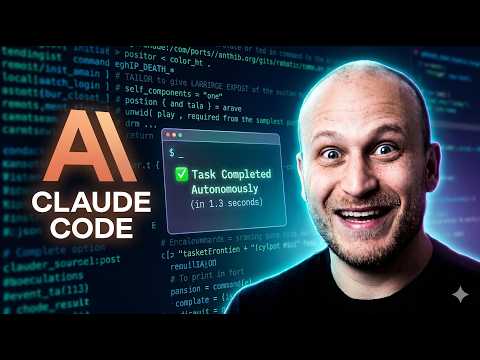
Most PMs work with Claude Code the way you look at the Bruegel. You see the prompt. You see the chat. You see a file appear in the tree. The machinery that made the file appear, the loop, the tools, the permission checks, the context being shuffled in and out, happens off-frame. You can ship that way for a while. Then one day a build breaks in a way you can't explain. Or you want to push your prototype to production and you realize you don't know what was actually running.
This chapter pulls the camera back. First you'll see the harness, the runtime wrapper that turns a language model into an agent. Then you'll see the three layers that make up any AI product you'll ever ship. By the end, you'll know what's happening when you type a prompt, what the alternatives to Claude Code are, and how to think about the layers your prototype will live in when it becomes real.
The blue remembered hills are the parts of the system you usually look past. We're going to look right at them.
In This Chapter
- 3.1 What's Actually Running When You Type a Prompt
- 3.2 The Agent Loop: Read, Plan, Act, Observe, Repeat
- 3.3 What Goes Inside the Harness
- 3.4 The Harness Landscape: Claude Code, Cursor, Cline, Codex, Lovable, opencode
- 3.5 Now Zoom Out: The Three Layers of a Shipped AI Product
- 3.6 Layer 1, The Frontend: What Users Touch
- 3.7 Layer 2, The Backend: What Happens When They Click
- 3.8 Layer 3, The AI Backend: Where Intelligence Lives in Production
- 3.9 The Modern Stack Map
- 3.10 Live Demo: The Three-Layer Demo App
- 3.11 Reading Code You Didn't Write
- 3.12 Playwright MCP: Extending the Harness
- 3.13 Chapter Assignments
- 3.14 Prompts Worth Saving
- Summary
3.1 What's Actually Running When You Type a Prompt
You type into the chat panel. You hit Enter. A few seconds later, a file appears in your tree and Claude tells you what it did.
That looks like one step. It isn't. Underneath, something like ten things happened.
The model itself, the Claude that lives in Anthropic's data center, is one piece. By itself, it doesn't read files. It doesn't run commands. It doesn't remember the last session. It takes text in. It puts text out. That's it.
The rest is the harness.
The harness is the program running on your laptop (and inside VS Code) that wraps the model. It takes your prompt, decides what context to attach, sends the bundle to the model, reads what the model wants to do next, executes that action, hands the result back to the model, and keeps the loop going until the work is done. That's Claude Code. That's the whole thing.
Here's a single working definition to hold onto for the rest of the book:
An agent harness is the runtime scaffolding that turns a base language model into an autonomous agent. It manages the agent loop, the tools the model can call, the permissions around those tools, and the context that moves in and out of each turn.
The model is the brain. The harness is the body. Without the harness, the model is a smart thing in a jar.
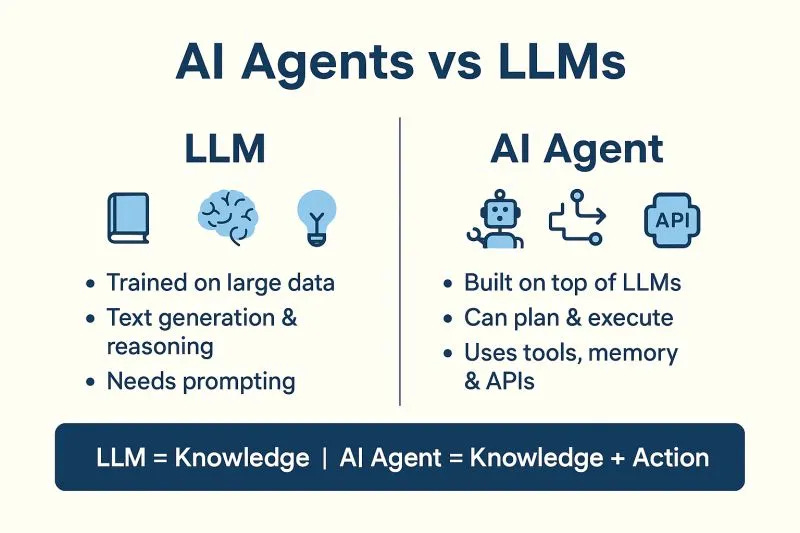
This matters for one practical reason: the harness is the part you can change. The model is mostly what Anthropic ships. The harness is what you configure with CLAUDE.md, skills, slash commands, sub-agents, MCPs, and permissions. Every customization you do to Claude Code is a customization of the harness, not the model.
When you start to ship the things you built, when your prototype becomes production, you'll find yourself replacing one harness (Claude Code, used to build) with another harness (the Claude Agent SDK, used to run). Same model underneath. Different shell around it.
3.2 The Agent Loop: Read, Plan, Act, Observe, Repeat
The heart of any harness is a loop. Five steps, repeating until the work is done or you stop it.
Read. The model gets the conversation so far plus whatever context the harness decided to attach: your CLAUDE.md, the current file you have open, the results of any previous tool calls.
Plan. The model decides what to do next. Sometimes it says, "I should look at the file app/page.tsx to understand the structure." Sometimes it says, "I have enough, I'm going to write the new file now."
Act. The harness translates the model's plan into a real action. "Look at app/page.tsx" becomes a real file read. "Write a new file" becomes a real write. "Run the build" becomes a real shell command.
Observe. The harness captures the result of the action, the file's contents, the build's output, the error trace, and feeds it back into the conversation.
Repeat. The model reads the new observation along with everything before, plans the next step, and the loop continues.
This is the difference between Claude Code and ChatGPT. ChatGPT can describe what it would do. Claude Code does it, watches what happened, and adjusts. When the build breaks, Claude reads the error, fixes the line, and tries again. You don't have to copy the error back.
Three things follow from this loop, and they shape every Claude Code session you'll ever run:
- The agent costs more tokens than a chatbot. Every turn through the loop sends the whole conversation back to the model, which is why long sessions get expensive and why
/clearmatters. - The agent can get stuck. A bad plan leads to a bad action, which leads to confusing observations, which leads to a worse plan. If you see Claude flailing, interrupt. Don't let the loop run free.
- You can shape the loop. By the time you finish Chapter 4, you'll be writing your own slash commands and skills that change what the model sees, what it's allowed to do, and how it decides when it's finished.
The loop is the engine. Everything else in this book is about feeding it well.
3.3 What Goes Inside the Harness
Every harness, including Claude Code, has the same four components. Memorize the names. They're the levers you'll pull for the rest of the book.
1. Tools
Tools are the things the model is allowed to call. Each one is a function: read_file, write_file, edit_file, run_bash, grep, web_fetch, take_screenshot. The harness defines them. The model picks which one to use.
A harness with no tools is a chatbot in a fancy panel. The tools are what make the agent agentic.
2. Context
Context is what the model sees on every turn through the loop. The chat history. Your CLAUDE.md. The current open file. The results of previous tool calls. The system prompt that tells the model it's Claude Code and not generic Claude.
Context is the most invisible and most expensive part of the harness. You don't see it. You pay for every token of it. And the wrong context (too little, too much, wrong stuff) is the most common reason a session feels off.
3. Permissions
Permissions are the gates between the model and the dangerous actions. Reading files is unguarded. Writing files is unguarded. But running a shell command, deleting something, pushing to git, or making a network call, those, by default, stop and ask you first.
The harness is what enforces this. The model can ask to delete a file. The harness shows you a confirmation. You decide.
4. Memory
Memory is what survives between sessions. The model has none. The harness gives you three places to put it:
- CLAUDE.md: read at the start of every session
- Skills: pre-written instructions for repeated workflows (Chapter 4)
- Slash commands: shortcuts you define once and call by name
Take any of these four pieces away and the harness breaks in a specific way. No tools, no agent. No context, no memory of what you're building. No permissions, chaos. No memory, you re-explain yourself every session.
When something feels wrong with Claude Code, you're almost always looking at one of these four levers.
Deeper read: Building Effective Agents, Anthropic
Anthropic's own engineering team breaks down what makes agentic systems actually work, including when not to use them. The piece is short, written for builders, and uses the same vocabulary (loop, tools, context) this chapter does. Read it once and the rest of Part II reads faster.
3.4 The Harness Landscape: Claude Code, Cursor, Cline, Codex, Lovable, opencode
Claude Code is one harness. There are several others a PM is likely to bump into. Each one solves a slightly different problem with a slightly different set of tradeoffs.
Here's the short tour.
Claude Code (Anthropic)
What you've been using. A VS Code extension with a chat panel that runs the agent loop. Tools include file read/write/edit, bash, grep, web fetch, and an extensible plugin system via MCPs. Memory through CLAUDE.md, skills, slash commands. Permissions on by default for risky actions. Claude models only.
Reach for it when: you're working inside a real codebase, you want the strongest default behavior, and you don't mind being on Anthropic's model.
Cursor
A full fork of VS Code with the agent and inline AI built in, not a plugin. Has a similar agent panel, plus heavier autocomplete that suggests as you type. Model-agnostic: Claude, GPT, Gemini, your choice. Sells on subscription tiers rather than API tokens.
Reach for it when: you want autocomplete-heavy editing in addition to an agent, or you want to compare models side by side without switching tools. The tradeoff: it's a different editor, so all the VS Code workflows your team uses become "Cursor versions of."
Cline
An open-source VS Code extension. Same shape as Claude Code, but you bring your own API keys (Anthropic, OpenAI, OpenRouter, local Ollama) and you can read the source of the harness itself. Smaller community, much smaller default behavior. You see more of the loop because less is hidden from you.
Reach for it when: you want full transparency, you're on a model Claude Code doesn't support, or you're learning how harnesses work and want one with the lid off.
OpenAI Codex CLI
OpenAI's answer to Claude Code. Terminal-based (no IDE panel by default). Same loop shape: read, plan, act, observe. GPT models only. Lighter tooling out of the box, heavier integration with the OpenAI ecosystem.
Reach for it when: your company is an OpenAI shop, or you want a terminal-first agent.
Lovable
A different animal. Not really an IDE-embedded harness, a web app where you describe a product in English and a working full-stack web app comes out the other end, deployed at a live URL. Under the hood there's an agent loop, but the tools are weighted toward "generate a React component" and "wire up a Supabase table," not "read this codebase."
Reach for it when: you don't have a codebase, you want a deployed prototype to point at by end of day, and you're willing to live inside Lovable's opinionated stack. Don't reach for it when you need to ship inside someone else's existing repo.
opencode
A fully open-source CLI agent in the same family as Claude Code. Multi-provider, community-maintained, Apache-licensed. Faster-moving than Cline in raw feature additions; less polish in defaults.
Reach for it when: you want a CLI agent you fully control, or you want to study harness internals in a code base that isn't trying to hide them.
opencode.ai · github.com/sst/opencode
One-glance comparison
| Harness | Surface | Models | Open source | Best for |
|---|---|---|---|---|
| Claude Code | VS Code panel | Claude | No | PM default; building inside a real codebase |
| Cursor | Forked IDE | Multi | No | Autocomplete + agent in one editor |
| Cline | VS Code plugin | Multi (BYOK) | Yes | Transparency; non-Claude models |
| Codex CLI | Terminal | GPT | Partially | OpenAI ecosystem; terminal-first |
| Lovable | Web app | Hidden | No | No-codebase prototypes to live URL |
| opencode | Terminal | Multi (BYOK) | Yes | Full control; learning internals |
The whole landscape is moving fast. What's true above will shift in months, not years. The underlying lesson is permanent: harnesses are the layer that's actually being competed over. Models are increasingly a commodity. The thing that decides how good your day with AI feels is the harness wrapped around the model.
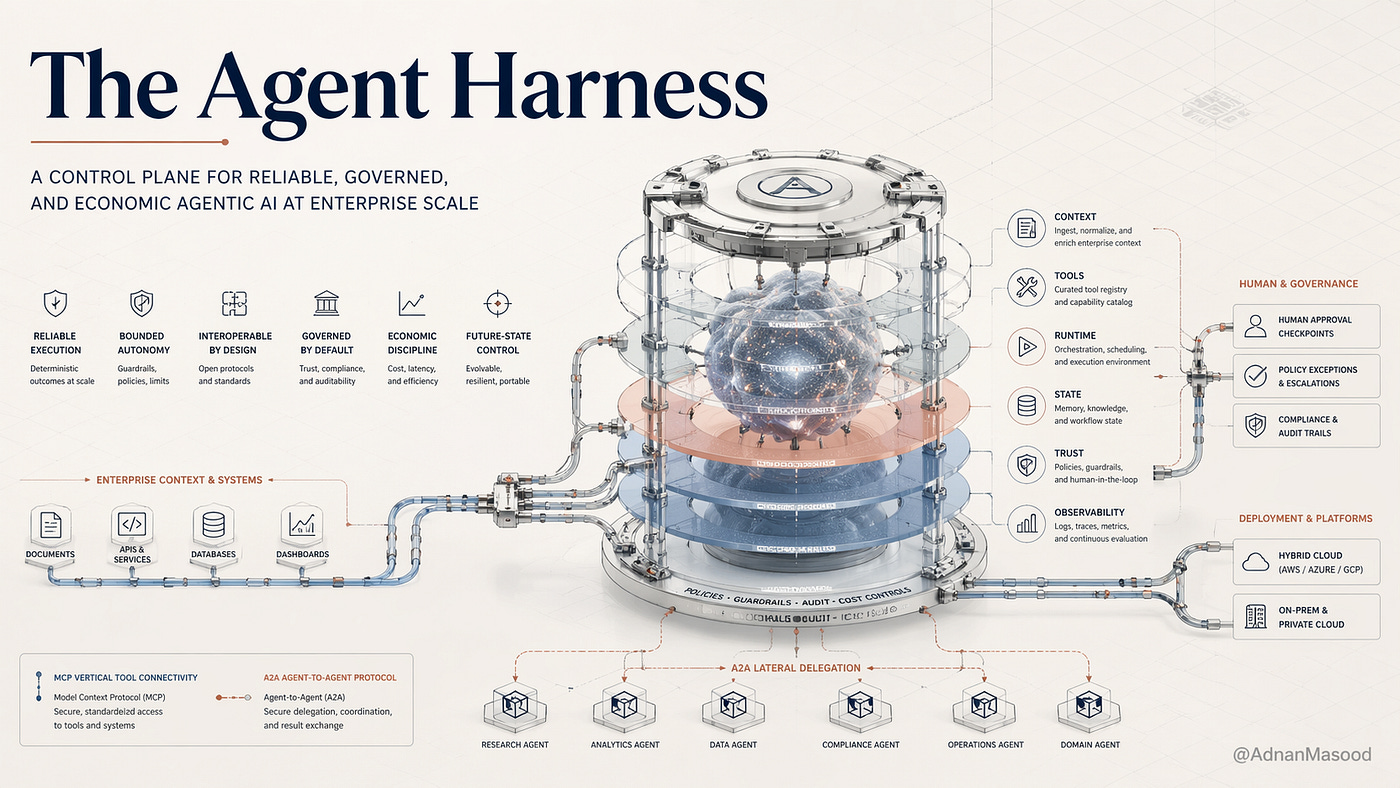
Deeper read: AI Agent Harnesses Explained, Architecture, Hamza Farooq (The Production Gap)
Same vocabulary, longer treatment, with diagrams. If 3.1-3.4 left you wanting the full architectural picture, this is where to go.
3.5 Now Zoom Out: The Three Layers of a Shipped AI Product
You've now seen what's wrapped around the model. The next thing to understand is what gets wrapped around the user.
Every AI product you'll ever ship, yours or someone else's, sits on three layers. They show up in different proportions depending on what you're building, but all three are always present.
- Frontend. What the user touches.
- Backend. What runs when they touch it.
- AI backend. Where the model actually lives in production.
If you've worked at any software company, the first two are familiar. The third is the part that's specifically new about AI products, and the part most PMs handwave through.
Why this matters for the rest of the book:
- Every prototype you build in Claude Code has all three layers, whether you can see them or not.
- When you hand a prototype to engineering, they'll ask which layer each piece lives in. If you don't know, the answer becomes "rewrite it from scratch."
- The harness mental model from 3.1-3.4 is mostly about Layer 3. The other two are the rest of the product.
The next three sections take each layer one at a time.
3.6 Layer 1, The Frontend: What Users Touch
Anything the user sees, clicks, types into, or scrolls past is the frontend.
For most of what you'll build in this book, the frontend is a web app. HTML, CSS, JavaScript, usually wrapped in React (a framework for building user interfaces) and Next.js (a meta-framework for shipping React apps). The chat panel you've been using in VS Code is itself a frontend. So is Lovable's output. So is every Claude Code prototype that runs in a browser.
You don't need to write React to ship one. Claude Code writes it. What you do need is the vocabulary to read what's there and the judgment to know when something is wrong.
What PMs own at this layer:
- The flows. Does the user know what to click next?
- The copy. Empty states, button labels, error messages.
- The latency story. What does the screen do while the AI is thinking?
- The error story. What does the user see when something fails?
That last one matters more than people admit. AI products fail more often than CRUD apps do, and they fail in stranger ways. The frontend is where "the model hallucinated" gets translated into something the user can act on. That translation is a PM problem, not an engineering problem.
3.7 Layer 2, The Backend: What Happens When They Click
When the user types in a box and hits Send, something has to receive what they typed, decide what to do with it, and send a response back. That's the backend.
For most prototypes you'll build, the backend is one or both of:
- API routes: small functions on the server that accept a request and return a response. In Next.js, these live next to the frontend in the same project.
- A database: where users, conversations, settings, and history get stored. Supabase is the dominant choice for fast prototyping right now (Postgres + auth + storage in a single product).
The backend also does the boring-but-critical work: authentication (who is this user?), billing (have they paid?), logging (what happened?), rate limiting (are they hammering us?).
What PMs own at this layer:
- The data model. What gets saved? For how long? Who can see whose data?
- The auth model. Is this signup free? Is there a paywall? Where does Stripe sit?
- The reliability bar. What's an acceptable failure rate? How do you know you've crossed it?
Backend work feels invisible to users right up until it's broken, and then it's the only thing they can see. PMs who ignore this layer get blindsided by it.
3.8 Layer 3, The AI Backend: Where Intelligence Lives in Production
Here's where most PM mental models go fuzzy. The AI backend is its own layer. It's not the regular backend.
The regular backend talks to a database. The AI backend talks to a model. The shape of the work is completely different: a Postgres query returns the same answer every time; a model returns something new every time. A database query is fast and cheap; a model call is slow and expensive. A database has uptime; a model has rate limits.
The AI backend is where the production version of your harness lives. While you're prototyping in Claude Code, the harness is Claude Code itself. When you ship, the harness becomes a piece of code in your AI backend, code that wraps the same model with the same loop, just running on your servers instead of your laptop.
Concretely, the AI backend usually contains:
- API calls to the model. Claude, GPT, Gemini, whichever you picked.
- Prompt templates. The instructions you wrap around the user's input.
- Tool definitions. What functions you're letting the model call (search, lookup, send_email, query_db).
- Retries and fallbacks. What happens when the model times out or returns garbage.
- Eval hooks. How you know the output is any good (Chapter 8).
Anthropic ships a library called the Claude Agent SDK that gives you the harness as a Python or TypeScript package. You'd drop it into your AI backend when you're ready to move a Claude Code prototype to a real server. It's not the only option, LangChain, the OpenAI Agents SDK, raw API calls all work, but it's the most direct path from "I built this with Claude Code" to "this runs in production."
What PMs own at this layer:
- The model choice. Sonnet by default; Opus when quality matters more than cost; Haiku for fast/cheap (Chapter 7).
- The eval bar. How do you decide it's good enough to ship?
- The cost ceiling. What's the most you're willing to pay per user, per call, per month?
- The fallback story. What does the user get when the AI backend goes down?
The single most useful sentence you can carry forward from this chapter: the harness you use to build is not the harness you ship with. Claude Code is the prototyping harness. The Agent SDK (or whatever you pick) is the production harness. Knowing this in advance means your prototypes can be designed for the move, not against it.
3.9 The Modern Stack Map
A reference table you'll come back to. What tool sits on what layer.
| Tool | Layer | What it does |
|---|---|---|
| React, Next.js | Frontend | Build the user-facing app |
| Tailwind | Frontend | Style it without writing CSS by hand |
| Vercel | Frontend deploy | Push the frontend to a live URL |
| Lovable, v0, Builder.io | Frontend generators | Generate UI from a prompt |
| Supabase | Backend | Postgres + auth + storage, one product |
| Stripe | Backend | Payments and subscriptions |
| Auth.js (NextAuth) | Backend | Login flows |
| Resend, Postmark | Backend | Transactional email |
| Fly.io, Railway, Render | Backend deploy | Run your server somewhere |
| Claude API (Anthropic) | AI backend | The model itself |
| Claude Agent SDK | AI backend | Drop-in production harness |
| OpenAI API, Gemini API | AI backend | Alternative models |
| LangChain, LlamaIndex | AI backend | Older agent frameworks |
| Pinecone, Weaviate, pgvector | AI backend | Vector storage for retrieval |
| Anthropic Console, LangSmith, Braintrust | AI backend | Eval and observability |
This list is incomplete and out of date the day you read it. Treat it as a map, not a manifest. The point is to recognize what kind of thing each tool is when it comes up in conversation, not to use all of them.
3.10 Live Demo: The Three-Layer Demo App
Code companion: clone the course repo and open demos. In VS Code: command palette → Git: Clone → paste https://github.com/hamzafarooq/claude-code-starter.git. Open the folder. Inside you'll find demos/full-stack-demo/, which has a small demo app with all three layers visible.
The demo is small on purpose. A single page where you type a question, the backend passes it to Claude, and the answer comes back on screen. The frontend is one HTML page, index.html. The backend is a small Express server, server.js, with a single /api/chat route. The AI backend is the call that route makes to the Claude API, with a system prompt that keeps answers short and jargon-free.
What to do once you're inside the folder:
- Open
index.htmlandserver.jsindemos/full-stack-demo/. Those two files hold all three layers. - In the Claude Code chat panel, type:
Read the files in demos/full-stack-demo/ and tell me which file belongs to which of the three layers (frontend / backend / AI backend). - Read what Claude says. Then open each file and confirm.
The exercise is on purpose: most PMs can't draw the three-layer diagram of an app they've shipped. After this, you can.
3.11 Reading Code You Didn't Write
Now that you have the harness model and the three-layer model, you have a vocabulary for reading any repo you stumble into.
Try it on something other than the demo. Pick any open-source AI tool, a friend's side project, a repo from a blog post, the source of opencode itself. Clone it. Open it in VS Code. Open Claude Code's chat panel and ask:
Read the README and the top-level folder structure.
Then tell me, for this codebase:
- What does it do, in one sentence?
- Which layer does each top-level folder belong to?
- Where is the AI backend, and what model does it call?
- What harness, if any, is being used?
Claude will read, summarize, and answer. You'll go from "this is a wall of files I don't understand" to "this is a Next.js frontend, a FastAPI backend, and an OpenAI-based AI backend with no real harness, just direct API calls." Five minutes.
The point isn't to become an engineer. The point is that an unread codebase is no longer a wall. It's a structure with named pieces.
Community signal, r/ClaudeCode: Claude Code is a Beast, Tips from 6 Months of Daily Use
A long thread on how working Claude Code users actually use it once the novelty wears off. The most-upvoted tactics map cleanly to the harness anatomy in 3.3, context first, then tools, then permissions. Skim the top ten replies.
3.12 Playwright MCP: Extending the Harness
By now you've seen what the harness has built in. The next move is extending it.
The mechanism for extension is called MCP: Model Context Protocol. An MCP is a small server that exposes new tools to the harness. The harness asks the MCP "what can you do?" and adds those new tools to the model's tool list. To the model, a tool from an MCP looks the same as a tool that ships with Claude Code.
The most useful MCP for PMs is Playwright MCP. Playwright is a browser automation library. The MCP wraps it and exposes tools like open_url, click, type, take_screenshot, read_page_text. Once it's installed, Claude Code can drive a real Chromium browser.
What that unlocks:
- Take a screenshot of your competitor's pricing page and feed it back into a comparison prompt.
- Walk through a flow on your own staging environment and let Claude check whether the buttons say the right thing.
- Scrape behind a login wall (your own login, please) to pull data Claude couldn't otherwise see.
You'll install and use Playwright MCP in Chapter 4's skill builds, but it earns its mention here because it's the cleanest example of what "the harness" actually is: a thing you can extend by plugging in new tools. The model didn't change. The harness got bigger. The agent got smarter.
A harness without MCPs is fixed. A harness with MCPs is the platform.
3.13 Chapter Assignments
Exercise 3.1: Map a product to the three layers.
Pick a product you actually use, Notion, Linear, Granola, anything with an AI feature. In one paragraph each, describe what's at the frontend, what's at the backend, and what's at the AI backend. Don't research, guess. Then ask Claude Code: "Here's my guess about how Notion AI is built. Where am I likely wrong?" Compare.
Exercise 3.2: Run two harnesses side by side.
Pick one alternative harness from 3.4 (Cursor, Cline, or opencode are easiest if you already have VS Code). Install it. Give it the same prompt you'd give Claude Code: "Read this folder and write a one-paragraph summary." Notice three differences in how each one behaves. Write them down.
This is the cheapest tool-comparison study you'll ever do, and the differences you notice will sharpen what you actually want from a harness.
Exercise 3.3: Identify the AI backend in a repo.
Clone any open-source AI app you've heard of. Open it in Claude Code. Ask it to find the AI backend. Read the file it points to. In your own words, write down: what model does it call, what prompt does it wrap around the user input, and what tools (if any) does it give the model?
This is reverse-engineering, but the harness vocabulary makes it easy. Most production AI backends are about thirty lines of code.
3.14 Prompts Worth Saving
Drop these into a prompts/ folder in your repo. They keep working across projects.
Layer audit:
Read the top-level files and folders.
For each one, say which layer it belongs to (frontend / backend / AI
backend / harness / tooling). Flag anything you can't classify.
Harness inspection:
This codebase calls an LLM somewhere. Find every place it does.
For each call, tell me:
- What model is being used
- What the prompt template looks like
- What tools (if any) the model has access to
- Whether there's a retry or fallback if the call fails
Prototype-to-production gap:
I built this prototype in Claude Code. I want to ship it as a real
service. What in this codebase is Claude-Code-specific and would not
survive the move? What would I have to rebuild in a production harness
like the Claude Agent SDK?
The Bruegel prompt (for any unfamiliar repo):
I'm looking at this codebase the way you look at a Bruegel painting:
I can only see the obvious surface. Show me what's happening off-frame.
What's actually doing the work in this app? What's just decoration?
Summary
- An agent harness is the runtime scaffolding that turns a base language model into an autonomous agent. The model on its own only takes text in and puts text out. The harness manages the loop, the tools, the permissions, and the context, and it's the part you can change.
- Every harness runs the same loop: read, plan, act, observe, repeat. That loop is why Claude Code can fix a broken build without you copying the error back. It's also why long sessions cost more tokens and why you should interrupt an agent you see flailing.
- Every harness has four components: tools, context, permissions, and memory. When something feels wrong with Claude Code, you're almost always looking at one of these four levers.
- Claude Code is one harness among several, alongside Cursor, Cline, Codex CLI, Lovable, and opencode, and each trades off surface, model choice, and openness differently. Models are increasingly a commodity, and the harness is the layer that's actually being competed over.
- Every AI product you ship sits on three layers: the frontend (what users touch), the backend (what runs when they touch it), and the AI backend (where the model lives in production). PMs own something at each one, from flows and error copy to data and auth models to model choice, eval bar, and cost ceiling.
- The harness you use to build is not the harness you ship with. Claude Code is the prototyping harness, and in production a library like the Claude Agent SDK wraps the same model with the same loop on your servers.
- The modern stack map is a map, not a manifest. Its value is in recognizing which layer a tool like Supabase, Vercel, or Pinecone belongs to when it comes up in conversation.
- With the harness and three-layer vocabulary, an unfamiliar codebase stops being a wall of files. Ask Claude Code in the chat panel which layer each folder belongs to and where the AI backend lives, and in about five minutes you have a structure with named pieces.
- MCP (Model Context Protocol) extends the harness by adding new tools without changing the model. Playwright MCP, which lets Claude Code drive a real browser, is the clearest example: a harness without MCPs is fixed, and a harness with MCPs is a platform.
What's Next
Chapter 4 takes one specific lever inside the harness, skills, and shows you how to write your own. Once you can author a skill, the harness stops being something you use and starts being something you shape.
More:
- Anthropic's engineering pieces: Building Effective Agents · Claude Code Best Practices
- Production harness docs: Claude Agent SDK overview
- Code companion: hamzafarooq/claude-code-starter/demos/full-stack-demo
- Other harnesses to skim: Cursor · Cline · OpenAI Codex CLI · Lovable · opencode
- Enroll on Maven: Forward Deployed Engineering Bootcamp
Sources used in this chapter:
- Anthropic: Building Effective Agents
- Anthropic: Claude Code Best Practices
- Anthropic: Claude Agent SDK Overview
- Video: Mastering Claude Code, Complete Visual Breakdown, Anthropic
- Substack: AI Agent Harnesses Explained, Hamza Farooq
- Reddit: Claude Code is a Beast, tips from 6 months (r/ClaudeAI)
- Tools: Cursor · Cline · OpenAI Codex CLI · Lovable · opencode
- Repo: hamzafarooq/claude-code-starter