
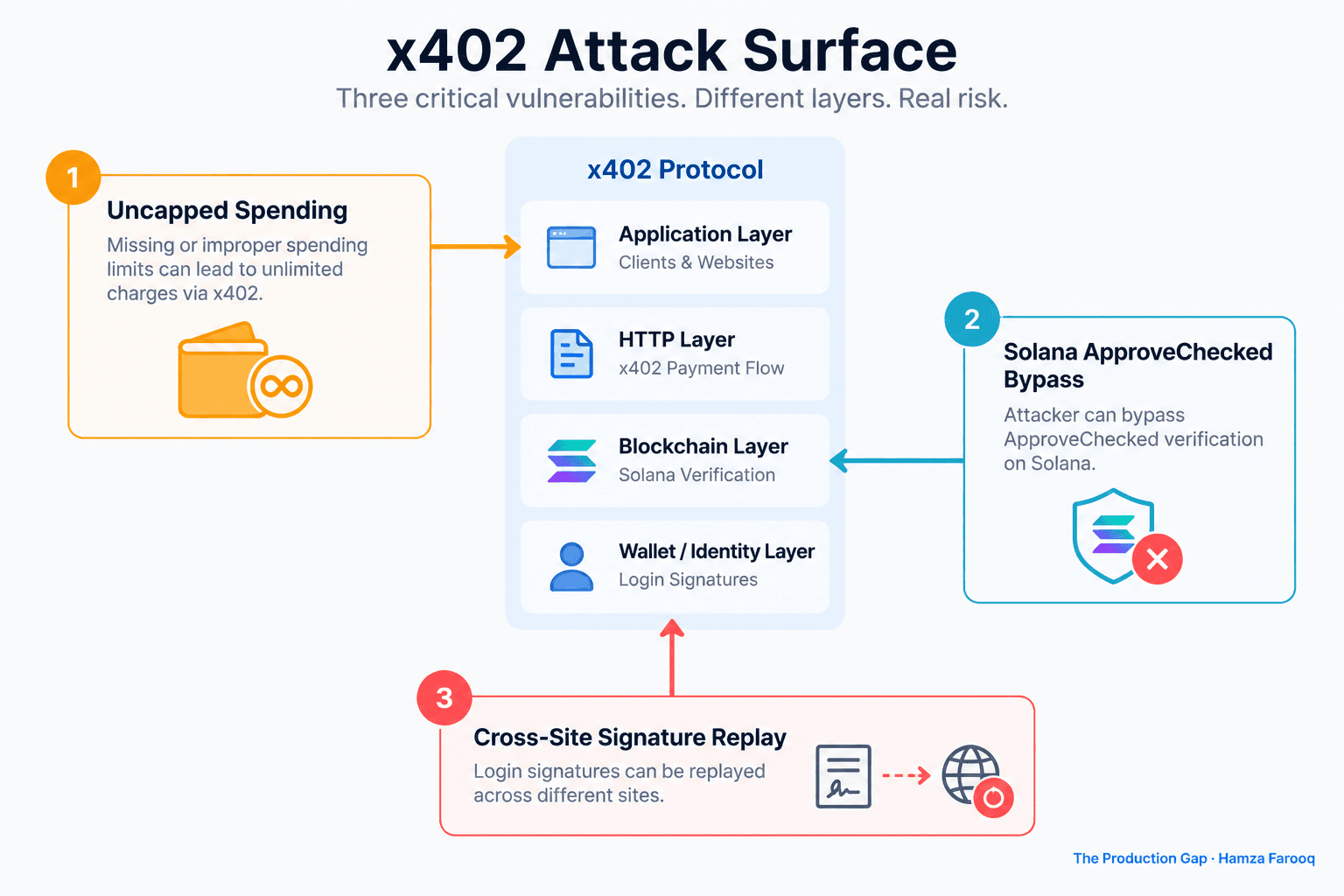
TL;DR: As of June 2025, x402 payment security vulnerabilities include three critical risks: uncapped default spending limits, a Solana ApproveChecked verifier bypass that accepts token approvals as proof of completed payment, and a cross-site login signature replay attack. Auditing your implementation requires checking your exact version, spending cap configuration, and dependency pipeline. Standard npm audit output misses all three exposures because no CVE was assigned to the relevant fix.
Key Takeaways
- x402 has no default spending cap: By default, a compromised or malicious server can charge an AI agent any price with no client-side limit triggering. Action: confirm your installed version's default and set an explicit cap.
- The Solana verifier accepts fake transfers: A pre-patch verifier accepts an ApproveChecked instruction as proof of completed payment, allowing attackers to receive service without sending funds. Action: test your verifier on devnet before trusting production results.
- Login signatures can be replayed across sites: The signed payload omits origin binding, so a captured signature can authenticate on any x402-protected site. Action: upgrade to a version with origin binding and add server-side origin validation as an interim compensating control.
- npm audit is blind to this entire exposure class: Zero CVE assignment produces zero warnings on vulnerable installs. Action: subscribe to the x402 GitHub releases feed and adopt a policy requiring upgrade evaluation for payment-critical dependencies regardless of CVE status.
- Treat severity ratings as a starting point: The issues described here were surfaced by a third-party researcher, not the protocol maintainer. Verify findings independently against the published disclosure before assigning internal priority.
Vulnerability Summary
| Researcher ID | Affected Component | Severity | Patch Status | CVE Assigned |
|---|---|---|---|---|
| x402-VULN-001 | x402 client spend controls | Critical | Patched (cap introduced as new default) | No |
| x402-VULN-002 | Solana payment verifier | Critical | Patched (Transfer/TransferChecked required) | No |
| x402-VULN-003 | x402 login signature payload | Critical | Patched (origin binding added) | No |
Important caveat: The researcher IDs above follow the naming convention used in this guide as author synthesis for audit tracking purposes. Cross-reference against the researcher's published disclosure to confirm identifiers used in the original report.
What Is the x402 Uncapped Spending Vulnerability, and How Do You Audit for It?
By default, x402 clients carry no spending cap, meaning a server, legitimate or compromised, can charge any price and the client will pay it. This is not a misconfiguration in the traditional sense. It is the absence of a protective default, and the practical consequence is that a compromised price endpoint exposes every automated agent using the client to unlimited fund drainage with no client-side tripwire.
Audit checklist: - Run npm list x402 across all services and confirm your installed version against the patched version identified in the researcher's published disclosure. - Search your codebase for spendControls. If the key is absent, confirm in writing what default your installed version applies. - If spendControls: false is set intentionally, document the business justification and confirm per-call spend logging exists before accepting the risk. - Review who controls the value in the X-PAYMENT-REQUIRED header and whether that endpoint can be tampered with between server and client.
What Is the x402 Solana ApproveChecked Verifier Bypass, and How Do You Test for It?
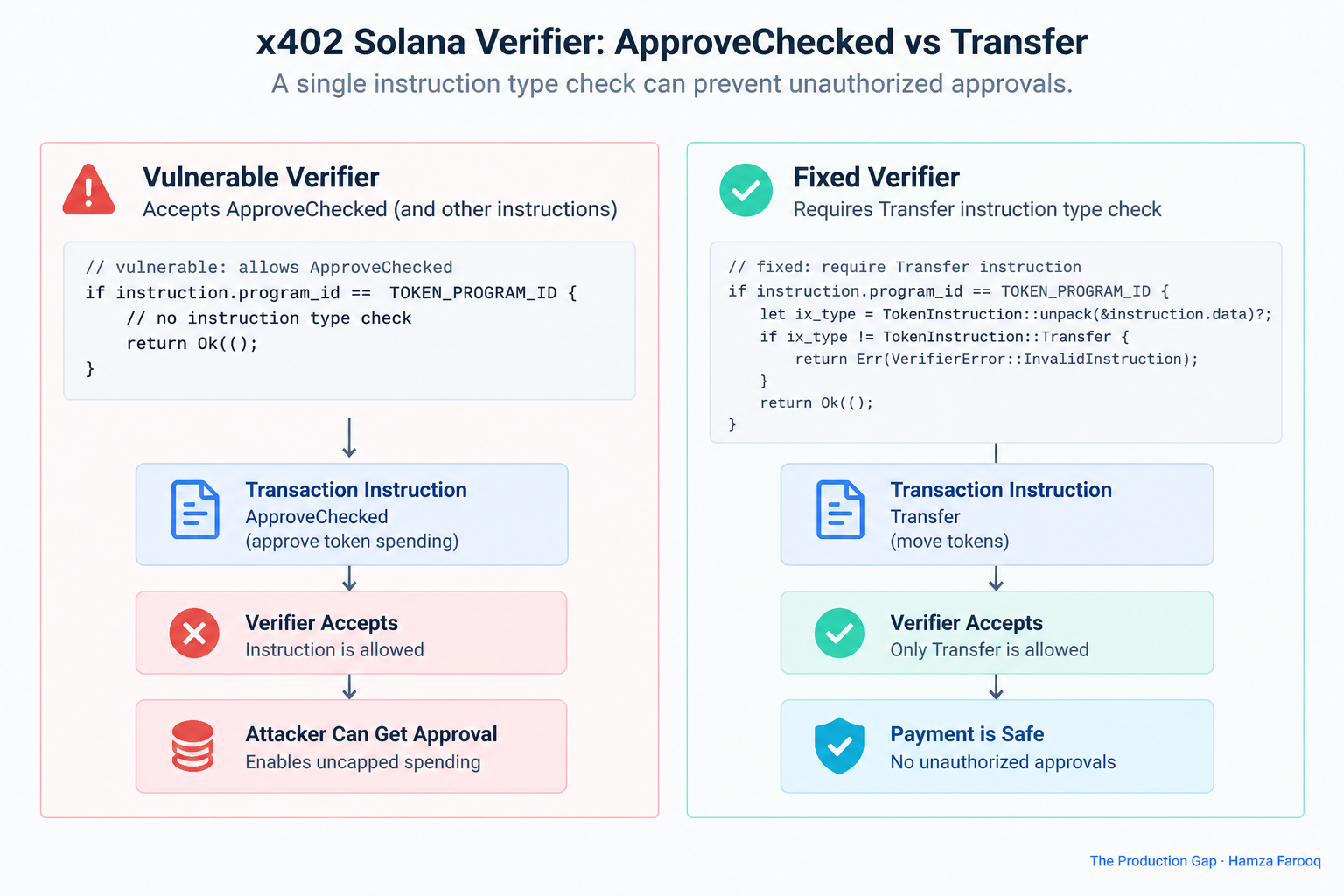
Audit checklist: - Locate the instruction-type assertion in your verifier source. Confirm it names Transfer or TransferChecked explicitly rather than accepting a broader instruction class. - On Solana devnet, submit a transaction containing only an ApproveChecked instruction. A patched verifier must reject it. Any 2xx response confirms the bypass is still present. - If consuming the verifier as a package dependency, confirm the upstream package version is at or above the patched release identified in the advisory. - Log all verifier decisions with the full instruction set for post-incident forensics regardless of patch status.
What Is the x402 Login Signature Replay Vulnerability, and Which Deployments Are Affected?
| Attribute | Protocol-level flaw | Implementation-level flaw |
|---|---|---|
| Who is affected | Every conforming pre-patch implementation | Only misconfigured deployments |
| Fix location | Spec update plus library patch | Deployment configuration change |
| Audit approach | Verify spec version and library version | Review per-service configuration |
| Retest requirement | After library upgrade is confirmed | After configuration remediation |
| Researcher classification | Critical | Varies by finding |
Audit checklist: - Inspect the signed payload directly. Confirm it includes the requesting origin or a server-generated nonce bound to the session. - If running a pre-patch version, treat the deployment as fully exposed regardless of any configuration adjustments. - Add server-side origin validation as a compensating control while an upgrade is in progress. - Review session logs for signatures used across multiple origins within a single session window, which is the fingerprint of an active replay attempt.
Why Does npm audit Show Clean on a Vulnerable Install, and How Do You Actually Detect This?
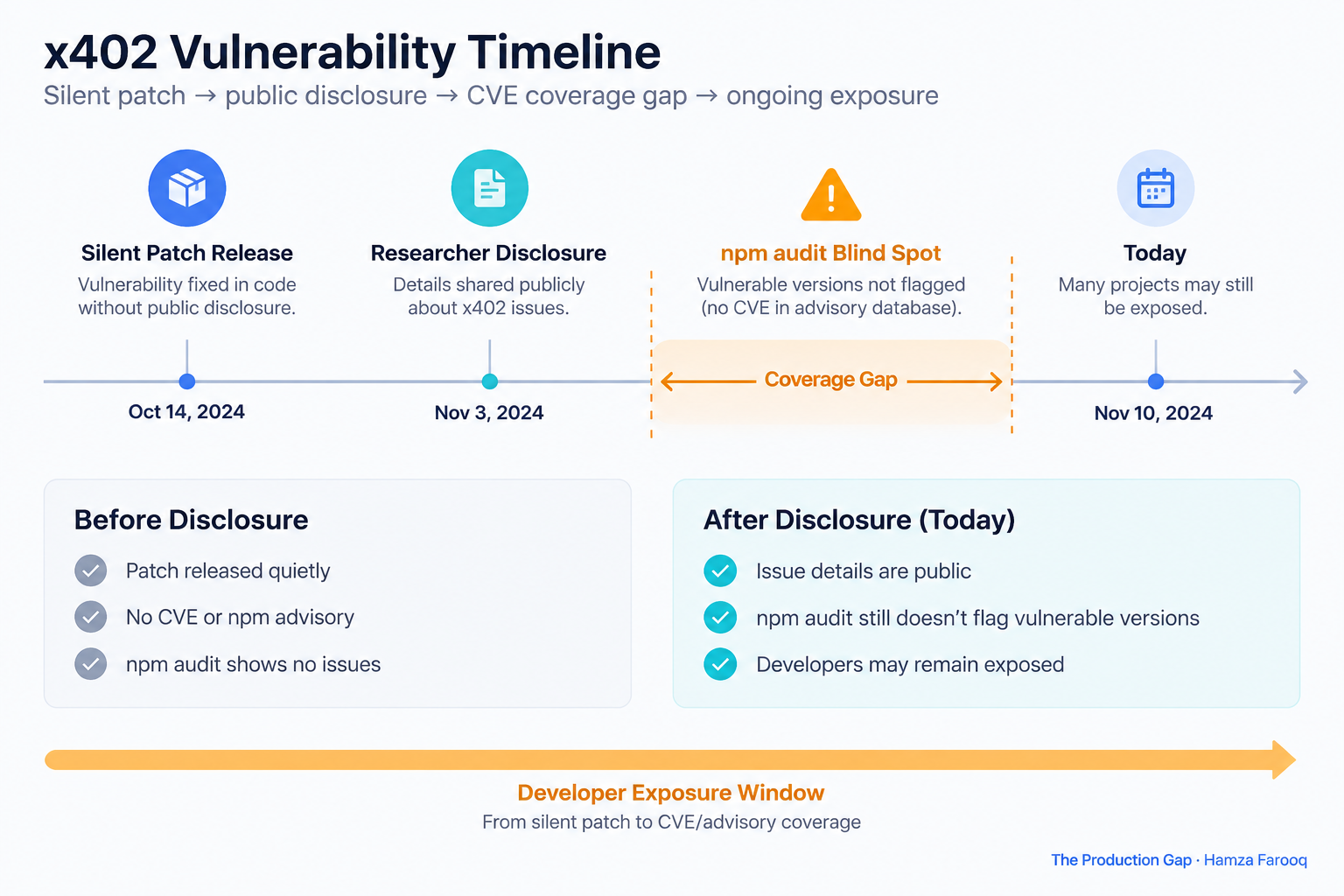
Concrete alternative detection checklist: - Version-pin audit: Run npm list x402 across all services and compare the output against the patched version confirmed in the researcher's advisory. - Changelog monitoring: Subscribe to the x402 GitHub releases feed. Release changelogs carry security context that advisory databases will not surface when no CVE is filed. - SBOM diffing: Any service built before the patch date without a subsequent lock file update is likely running a vulnerable version. - Governance policy review: Confirm whether your organization's policy requires upgrade evaluation for payment-critical dependencies regardless of CVE assignment. If it does not, this blind spot applies to every payment library you operate.
Frequently Asked Questions
Does upgrading to the patched version fully remediate all three findings? Yes, provided the upgrade is applied to every service that instantiates an x402 client or verifier. Also audit spendControls after upgrading. The patch introduces a spending cap as a new default, but the configuration option to disable it explicitly remains available.
Is setting spendControls: false in the patched version ever appropriate? Only for transactions between trusted parties where compensating controls are already in place: per-call spend logging, server-side price validation, and anomaly alerting. It is not an appropriate default for AI agents calling third-party APIs.
How do I test whether my Solana verifier rejects ApproveChecked without affecting production? Submit a transaction containing only an ApproveChecked instruction to your verifier endpoint on Solana devnet. Any 2xx response confirms the bypass is still present and the service is running a pre-patch verifier.
Why was no CVE filed, and who is responsible for closing that gap? CVE assignment requires either vendor self-reporting or a third-party MITRE request. Vendors of payment-critical libraries should file CVEs for security-relevant fixes. Teams should not treat CVE assignment as their primary upgrade signal for payment infrastructure.
Conclusion
All three vulnerabilities are fixable by upgrading to the patched version identified in the researcher's published disclosure. The more durable problem is the disclosure pattern itself: a critical patch shipped with no CVE, no advisory, and no npm signal, and no automated mechanism in a standard security toolchain would have flagged it.
Run npm list x402 across your entire deployment footprint now and compare the output against the confirmed patched version. Then close the governance gap so the next silent patch gets caught through version monitoring before public disclosure forces the issue.
The vulnerability is patched. The blind spot that let it sit undetected is not.
Learn from me

Forward Deployed Engineering Bootcamp for Full-Stack Developers, my Maven cohort. Build and ship complete AI products end to end, from React and Node.js frontends to deployed models with caching and observability. Join the next cohort →
Hire us
Traversaal.ai. We're a team of forward deployed engineers solving the toughest AI problems for Fortune 100 companies: document intelligence, agentic data platforms, and real-time web intelligence, deployed in production. Work with our team to deploy your next agentic ecosystem. Talk to Traversaal.ai →
Join us
Want to solve these problems with us? We're always looking for forward deployed engineers who want to ship production AI. jobs@traversaal.ai
