
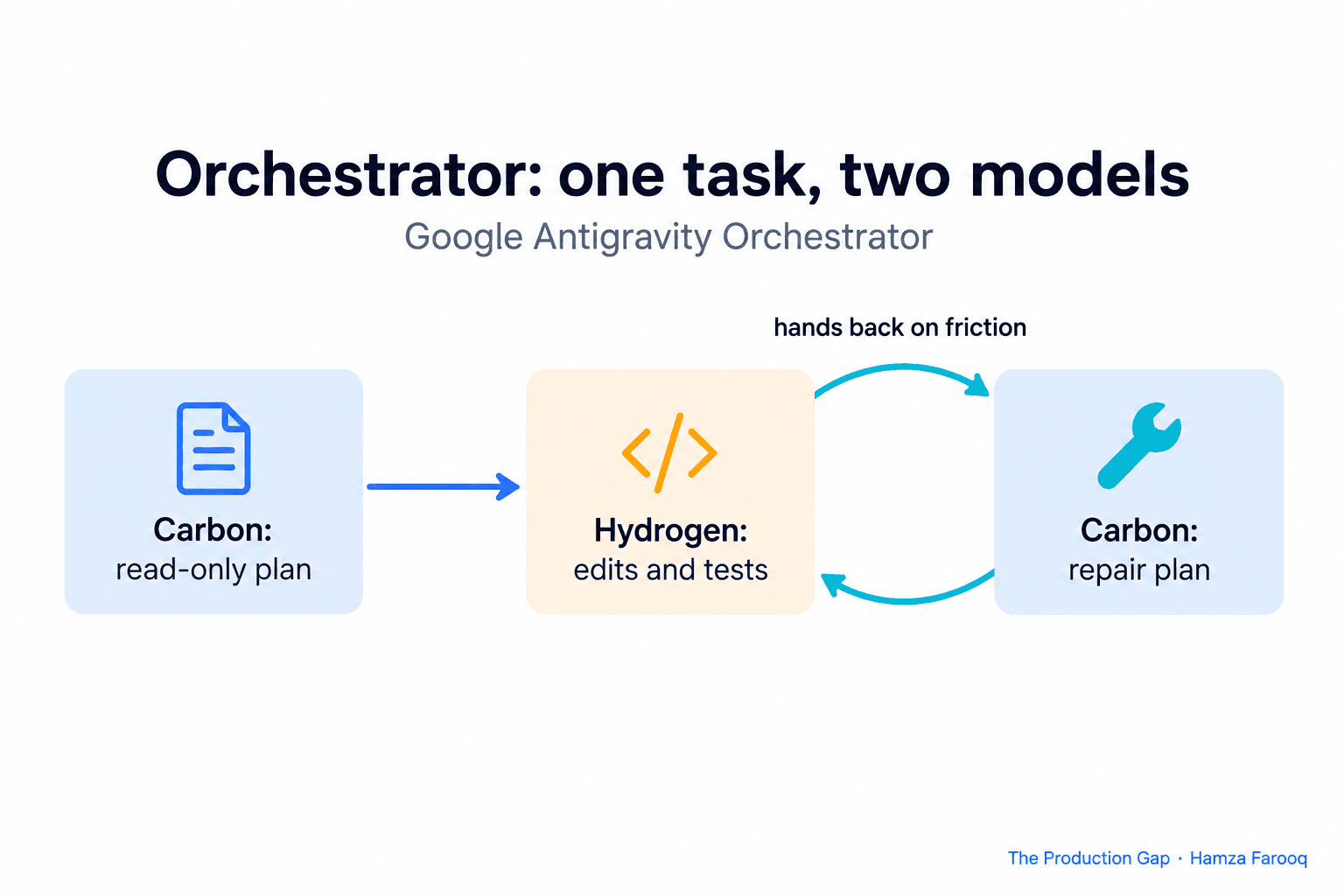
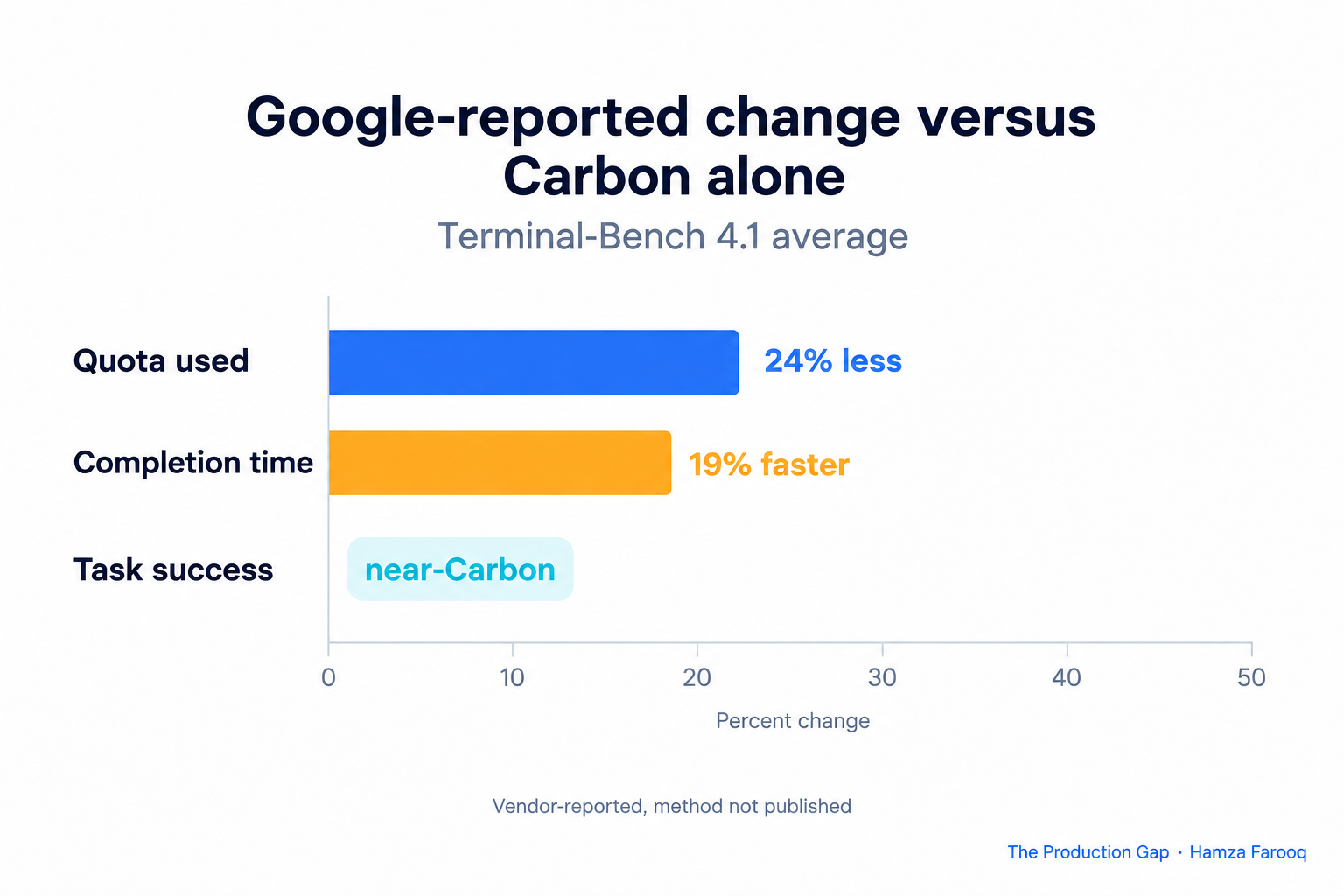
Google Antigravity Orchestrator switches between two models inside one task: Carbon plans and repairs, and Hydrogen can take over edits and tests. Google says that on Terminal-Bench 4.1 it reached near-Carbon task success while, on average, using 24% less quota and finishing 19% faster. Those are vendor-reported averages with no published method, so treat them as a hypothesis to test on your own tasks.
TL;DR: Orchestrator, announced November 12, lets Carbon handle read-only planning and plan repair while Hydrogen handles edits and tests in the same task. Google reports near-Carbon success with 24% less quota and 19% faster completion on Terminal-Bench 4.1, but has not published how it computed the averages. To check the claim, run the same tasks through Carbon alone, Hydrogen alone and Orchestrator, repeat each run, and compare success, quota and wall-clock time.
Key Takeaways
- Dated trigger: Google's Antigravity team announced Orchestrator on November 12 alongside Gemini 4 Hydrogen.
- Reported result: Near-Carbon task success, 24% less quota and 19% faster completion, as an average on Terminal-Bench 4.1.
- Missing detail: The post gives no sample size, task selection or averaging method, so the numbers are claims.
- Test shape: Three arms (Carbon, Hydrogen, Orchestrator), the same tasks, repeated runs, paired comparison.
- Decision rule: Adopt the split only if success holds on your tasks and the savings survive your own measurement.
What is Google Antigravity Orchestrator?
Orchestrator is a model option in Google Antigravity that alternates between Carbon and Hydrogen within a single task. According to Google's Antigravity announcement, it pairs Hydrogen with Google's strongest models for long-horizon work instead of assigning one model to the whole job.
The roles are split by phase. Carbon can start in a read-only phase to explore dependencies and build a plan. Hydrogen can then take over edits, package updates and test runs. When Hydrogen hits friction, the task can go back to Carbon, which inspects the state, repairs the plan and resumes.
Here the product does the switching for you.
Availability is tiered. The post lists Orchestrator (Carbon) and Orchestrator (Argon) for Google AI Ultra subscribers, and Orchestrator (Argon) for paid Google AI Pro subscribers.
What exactly did Google report?
Google reports that on Terminal-Bench 4.1, Orchestrator reached near-Carbon task success while, on average, consuming 24% less quota and completing 19% faster. That sentence comes from the same Antigravity post, and it is the only source for these figures that I could find.
Three details matter before you repeat the numbers.
First, "near-Carbon" is not a number. The post does not say how close, so a reader cannot tell whether the gap is half a point or five.
Second, the post does not say how the averages were computed. It gives no sample size, no task selection and no variance, and I found no independent write-up of Terminal-Bench 4.1 results. The Vals.ai Terminal-Bench 4 page describes a 66-task community set graded on the final artifact, with an 8-hour agent limit, and lists no 4.1 version. I could not confirm what the 4.1 task set contains.
Third, the headline does not say which model contributed what. The same post puts Hydrogen alone at 57% on Terminal-Bench 4.1, but gives no matching Carbon-alone figure.
Where does /swarm fit in?
/swarm is a separate feature: a preview of a coordinated team of agents that Google announced two days before Orchestrator. Google's November 10 Carbon post says Google is previewing /swarm in Antigravity, turning a single prompt into a coordinated team of agents you can track in real time.
Orchestrator splits one task by phase, planning versus doing. /swarm turns one prompt into a coordinated team of agents. Test them separately, because mixing them makes it impossible to say which one moved your quota or success rate.
How do you test a plan-and-execute split yourself?
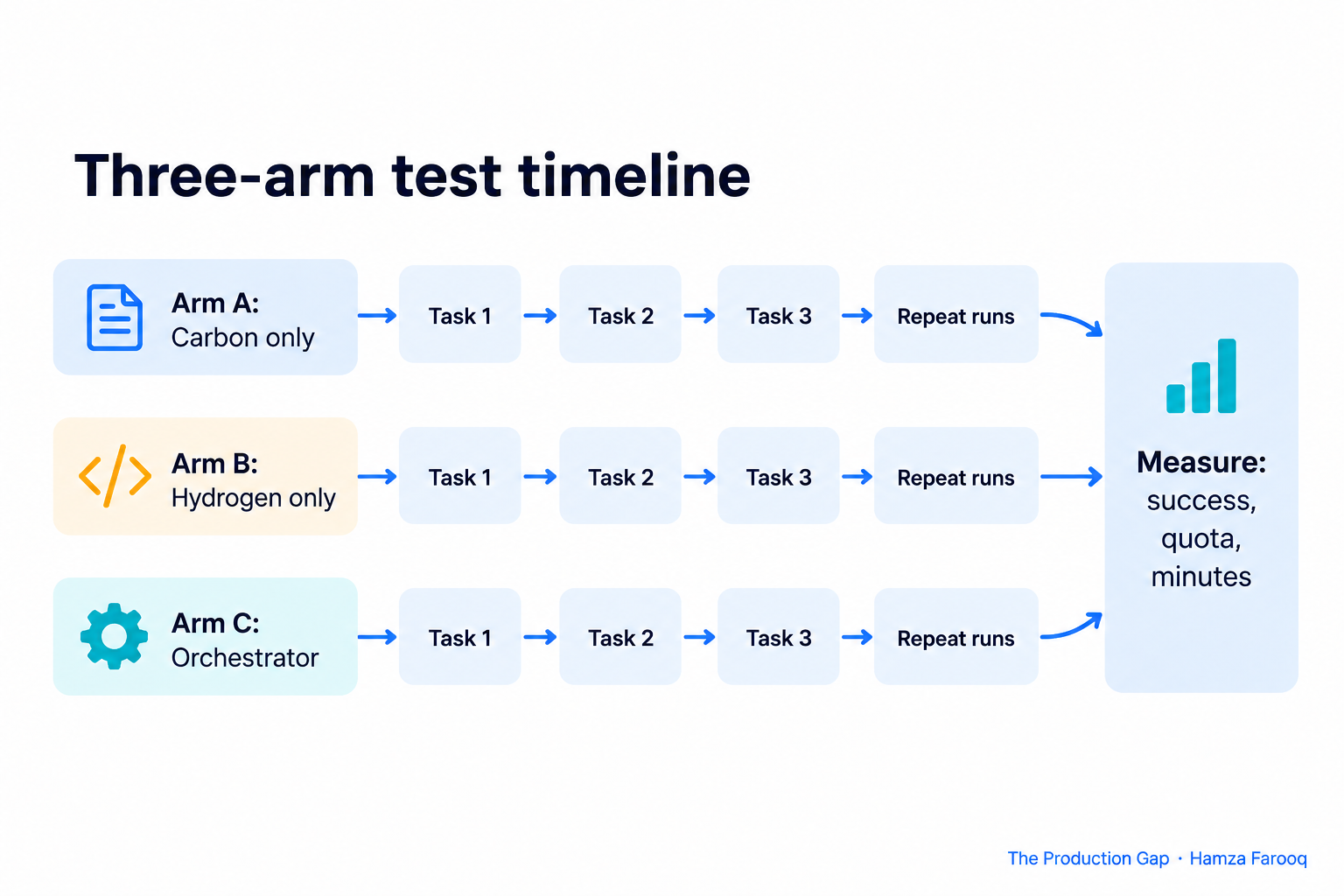
| Arm | What runs | What it tells you | Main cost |
|---|---|---|---|
| A: Carbon only | One strong model plans and executes | Your success ceiling | Your quota baseline |
| B: Hydrogen only | One model (Hydrogen) plans and executes | Whether you needed the planner at all | Quota unknown until measured, possible lower success |
| C: Orchestrator | Carbon plans and repairs, Hydrogen executes | Whether the split keeps A's success at lower cost | Needs repeats to separate signal from noise |
Without Arm B, a good result may only mean your tasks are easy. Without Arm A, you have no baseline for "near-Carbon".
Pick 20 to 40 tasks from your real backlog, not toy prompts. Mix bug fixes, dependency upgrades and multi-file refactors. Write the pass condition first, such as "all tests in this directory pass and the diff touches no other module." Use the same repo snapshot and instructions, with a fresh working tree per run.
Repeat each task at least three times per arm, because agent runs vary. Then compare paired results per task instead of comparing three overall averages. A split that wins on average but fails the hard tasks that Carbon alone solves is not near-Carbon for your work.
What should you measure, and what would change your mind?
Record four numbers per run: pass or fail, quota consumed, wall-clock minutes and number of hand-backs from Hydrogen to Carbon. Quota is the one to read carefully: take usage readings before and after each batch, and keep batches the same size.
Then decide in advance what counts as a win. A reasonable rule: Arm C's pass rate must sit within a few points of Arm A on your paired tasks, and its median quota and time must beat Arm A by a margin you care about. Half of Google's reported savings can still be worth it. A success drop on your hardest tasks is not.
Read the failures, not only the scores. Repeated hand-backs point to churn that eats the savings.
Frequently Asked Questions
What is the Carbon and Hydrogen split in Antigravity Orchestrator?
Google's post describes Carbon handling read-only exploration, planning and plan repair, and Hydrogen taking over edits, package updates and test runs. Orchestrator moves between them inside one task, and work can go back to Carbon when Hydrogen runs into friction.
Are Google's 24% and 19% figures independently verified?
No. They are Google's own averages on Terminal-Bench 4.1, and the announcement does not describe the task set, sample size or calculation. I could not find an independent replication, so run your own comparison before relying on them.
Is /swarm the same as Orchestrator?
No. /swarm is a separate preview that turns one prompt into a coordinated team of agents. Orchestrator switches models by phase within one task. Test them in separate experiments.
Which plans include Orchestrator?
Google lists Orchestrator (Carbon) and Orchestrator (Argon) for Google AI Ultra subscribers, and Orchestrator (Argon) for paid Google AI Pro subscribers. Check the announcement for current availability.
Conclusion
Treat Orchestrator as a promising, unreplicated claim. A three-arm test on 20 to 40 real tasks will tell you more than any benchmark headline. Adopt the split only when success holds on your hardest tasks and the quota and time savings show up in your own logs.
Learn from me
Agent Engineering Bootcamp: Developers Edition, my Maven cohort. Advanced agentic RAG, multi-agent orchestration, memory, evals, and guardrails. Take agents from prototype to production. Join the next cohort →
Hire us
Traversaal.ai. We're a team of forward deployed engineers solving the toughest AI problems for Fortune 100 companies: document intelligence, agentic data platforms, and real-time web intelligence, deployed in production. Work with our team to deploy your next agentic ecosystem. Talk to Traversaal.ai →
Join us
Want to solve these problems with us? We're always looking for forward deployed engineers who want to ship production AI. jobs@traversaal.ai
