
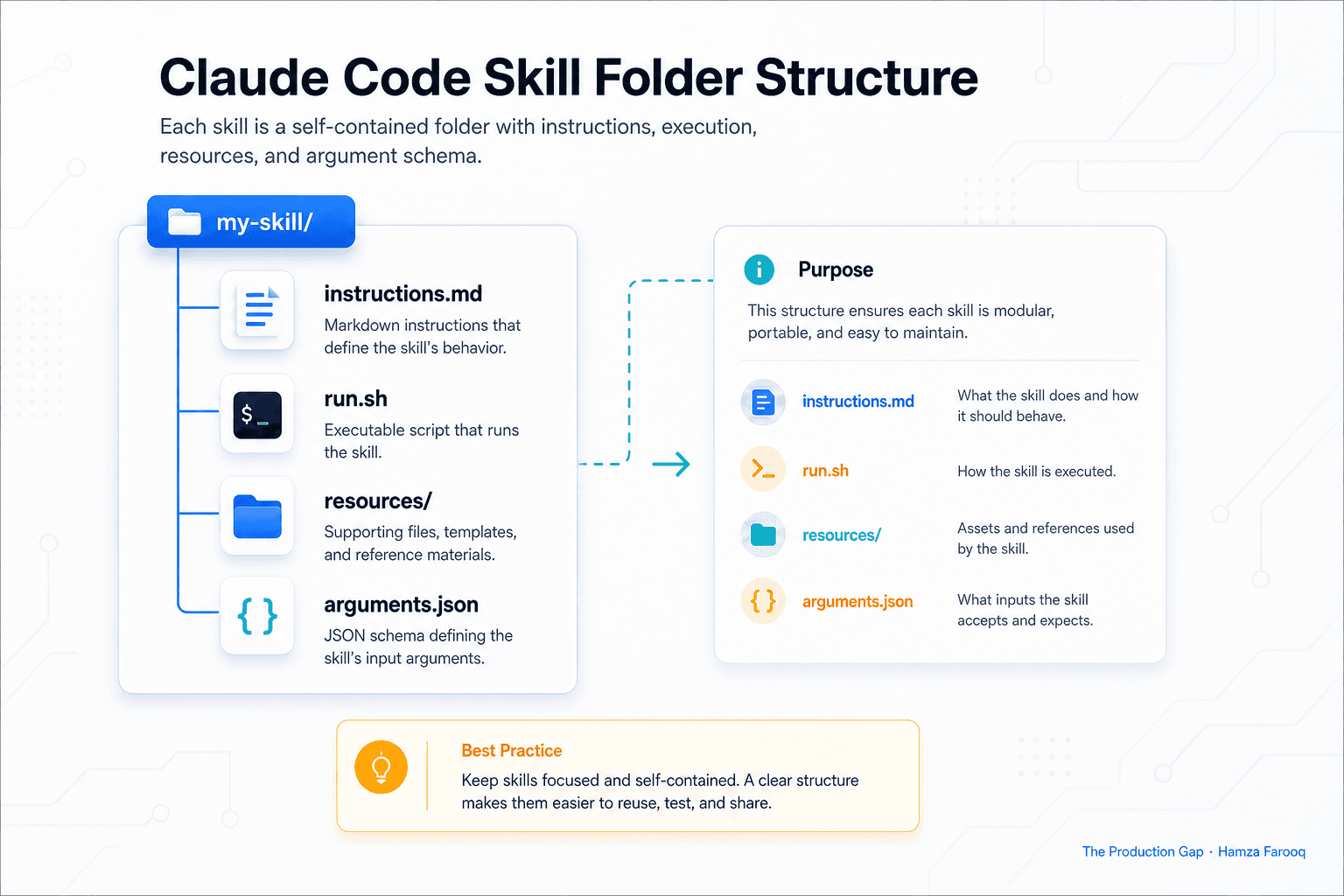
TL;DR: Claude Code skills are reusable, shareable behavior packages that extend Claude Code's capabilities beyond what a plain prompt or MCP server provides by bundling system instructions, tool permissions, and context into a single installable unit. Build one when you need consistent, repeatable workflows across projects or teams. Use raw prompts or MCP servers instead when your need is one-off or purely about tool access.
Key Takeaways
- Skills are folders, not single prompts: A structured directory of instructions, scripts, and resources Claude loads and executes as a repeatable unit.
- Skills vs. MCP servers are not the same thing: Skills handle prompt-and-script orchestration; MCP servers expose external tools and data, different problems, usable together.
- Subagent spawning is built in: Skills can launch child agents for parallel tasks, making them far more powerful than a saved prompt.
- Bundled skills are your fastest starting point: Anthropic ships
/doctor,/code-review,/debug, and others out of the box, exhaust these before building custom. - Build a custom skill when a workflow repeats: Multi-step processes that run more than a handful of times pay off quickly in consistency and saved setup time.
- Governance prevents skill sprawl: Growing libraries need versioning, ownership rules, and a shared registry.
Introduction
By mid-2026, Claude Code has grown from an experimental tool into the primary agentic coding environment at hundreds of engineering teams, with community marketplaces listing over 20000 skills across public hubs. The teams getting the most from it aren't prompting harder. They're packaging workflows into Claude Code skills: structured, versioned, repeatable units that make every agent run predictable.
What exactly is a Claude Code skill? (The folder, not the prompt)
A Claude Code skill is a self-contained directory, containing at minimum an instruction file, optional shell scripts, and optional resource files, that Claude Code loads, interprets, and executes as a repeatable, parameterized workflow unit. Think of it as a small software package for agent behavior. If you can version-control it in Git, you already know how to manage it.
The instruction file: where institutional knowledge lives
Every skill starts with a markdown instruction file, typically instructions.md, that tells Claude what the skill does, what inputs it expects, and what steps to follow. A three-line excerpt from a customized /pr-review skill:
Given a pull request URL and a reviewer persona (default: "security"),
analyze the diff for authentication anti-patterns and hardcoded secrets.
Flag any function exceeding 40 lines without an inline comment.
That logic lives in a senior engineer's head today. When a junior developer invokes /pr-review, they're borrowing that judgment without a Slack message or a meeting.
Shell scripts: what separates a skill from a saved prompt
Skills can include runnable scripts that Claude invokes at defined steps. A /db-migrate skill might execute a schema-diff script first, then hand the structured output to Claude for a plain-English summary. Claude isn't guessing at the schema, it's reading real data the script produced. That's a meaningfully different capability than pasting a prompt into a chat window.
The resources directory: context without copy-paste
The resources directory holds static files, templates, checklists, config snippets, that the skill loads at runtime. A customized /onboarding skill would pull stack-overview.md and coding-standards.md automatically. Nobody has to remember which Confluence page has the current standards. The skill knows.
Arguments and parameterization: making skills dynamic
Skills accept arguments at invocation. Calling /pr-review --url https://github.com/... --persona security runs meaningfully different analysis than --persona performance. That's the difference between a one-size-fits-all prompt and an actual tool with an interface.
Skills vs. prompts vs. MCP servers: which problem does each solve?
Claude Code custom skills, raw prompts, and MCP servers solve three different problems. Using the wrong one is a common and expensive mistake.
| Primitive | What it does | When to use it |
|---|---|---|
| Raw prompt | One-shot instruction to Claude | Exploration, one-off tasks |
| Claude Code skill | Packaged workflow with scripts and resources | Repeatable, multi-step team processes |
| MCP server | Exposes external tools and data to Claude | Connecting Claude to APIs, databases, file systems |
A raw prompt is a question. A skill is a procedure. An MCP server is a data pipe. The critical distinction: MCP servers don't encode workflow logic, they expose capabilities. Skills encode what to do with those capabilities. You might use all three together: an MCP server feeds live database schema to a /db-review skill, which runs a validation script, then produces a structured report.
Bundled skills: what Anthropic ships out of the box
The fastest starting point is the skills Anthropic bundles with Claude Code, and most teams underuse them. As of July 2026, bundled skills include /doctor, /code-review, /batch, /debug, /loop, and /claude-api. Each is production-ready and Anthropic-maintained.
/code-review is the most instructive to pull apart: a markdown instruction file defining review criteria, optional linting script hooks, and parameterized inputs for language and severity. Use it as a template for your first custom skill. Before building anything, ask whether a bundled skill covers 80% of the need. Often it does.
When to build a custom skill (and when not to)
Build a custom skill when a multi-step workflow repeats more than a handful of times and consistency across team members matters. Authoring a skill costs two to four hours; a team of eight running the same ad-hoc workflow weekly costs that every month in setup time and inconsistent output.
Don't build a skill for one-off tasks or processes that change every time. You'll spend more time maintaining it than running it.
Skills also work well as an onboarding tool. When a senior engineer's decision logic lives in a skill, every new hire inherits it on day one.
Skill authoring: a practical starting point
Start with the folder:
/skills/pr-review/
  instructions.md
  run.sh
  resources/
    checklist.md
  arguments.json
Write instructions.md first, describe the workflow in plain English, step by step. Add run.sh only when a step requires real execution. Put reusable reference material in resources/. Define expected arguments in arguments.json with types and defaults.
One rule that saves significant rework: write the instruction file before writing any scripts. It forces you to define the workflow precisely. Scripts written before that step usually solve the wrong problem.
Governance: preventing skill sprawl before it starts
Skill sprawl is a predictable problem. A team of twelve engineers authoring two or three skills each over six months ends up with thirty skills, some overlapping, some stale, some conflicting. Three rules that prevent it:
- Every skill has a named owner responsible for updates when the underlying process changes.
- Skills live in a shared registry, one repo directory or internal catalog, not scattered across personal dotfiles.
- Tag releases and bump the version whenever
instructions.mdchanges in a way that affects outputs.
Learn from me
Claude Code in Practice, my Maven cohort. Master Claude Code from fundamentals to advanced orchestration: skills, subagents, hooks, MCP, and production automation. Join the next cohort →
Hire us
Traversaal.ai. We're a team of forward deployed engineers solving the toughest AI problems for Fortune 100 companies: document intelligence, agentic data platforms, and real-time web intelligence, deployed in production. Work with our team to deploy your next agentic ecosystem. Talk to Traversaal.ai →
Join us
Want to solve these problems with us? We're always looking for forward deployed engineers who want to ship production AI. jobs@traversaal.ai
