
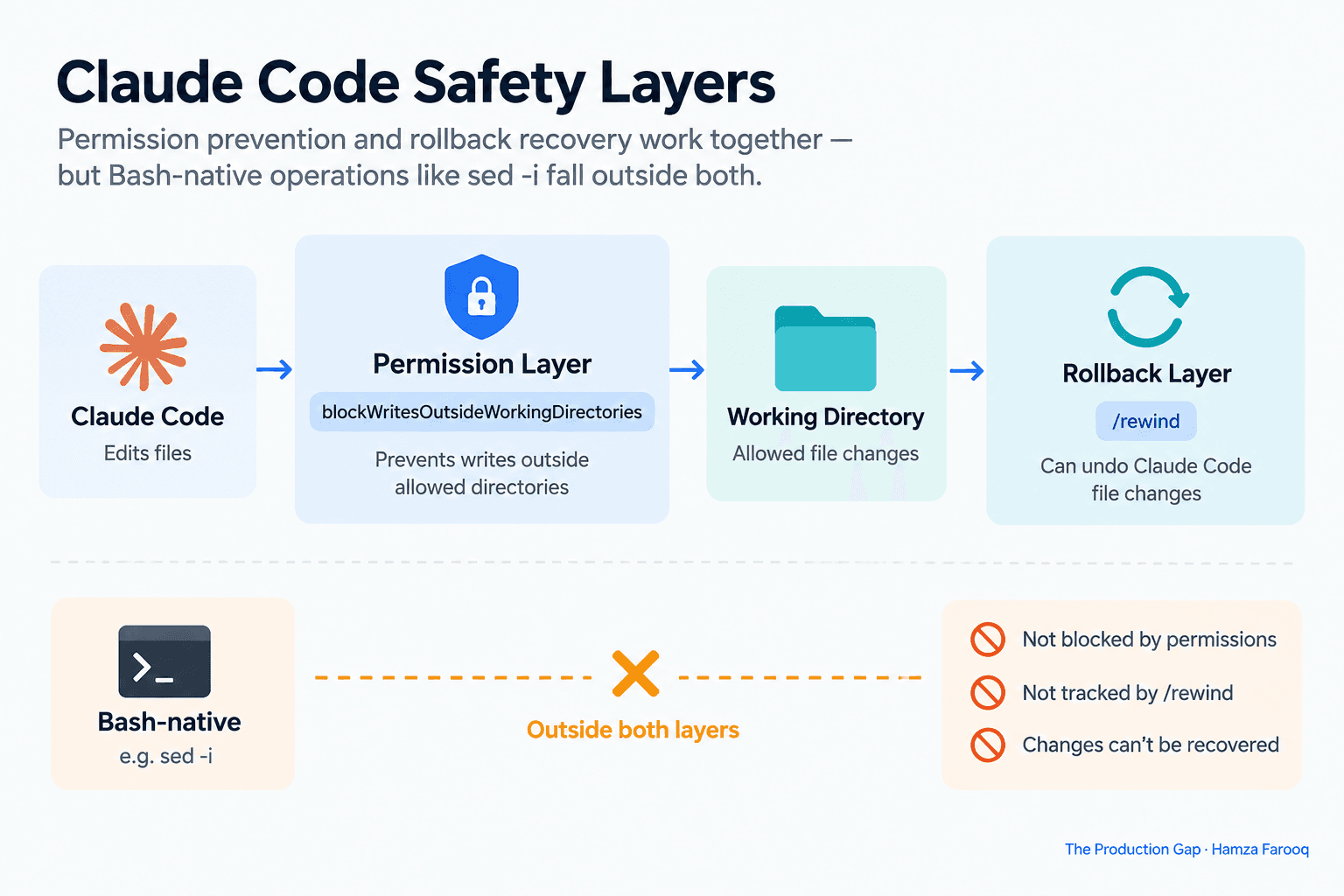
TL;DR: blockWritesOutsideWorkingDirectories blocks Claude's Write, Edit, and NotebookEdit tool calls from touching files outside your working directory. It does not intercept Bash commands like sed -i. The /rewind checkpoint system only tracks Claude's own named tool calls, so shell-native file changes are invisible to rollback. Teams need an independent snapshot strategy, such as a clean Git commit before each session, to cover that gap.
Key takeaways
- blockWritesOutsideWorkingDirectories targets three named tools: Write, Edit, and NotebookEdit. Bash commands are outside its scope entirely.
- sed -i runs as a native shell process that Claude's checkpoint system never observes, making the change invisible to /rewind.
- Prevention and rollback are separate layers: the permission setting stops bad writes before they happen; /rewind undoes writes that were allowed through named tools.
- A team enabling the setting and watching blocked Write calls may incorrectly conclude the boundary is secure, then Claude routes an edit through sed -i and the file changes anyway.
- Git and external snapshots fill the gap: teams running agentic workflows need an independent snapshot strategy to cover Bash-native blind spots.
- An unconfirmed assumption is not a safety model: audit your session prompts and classify every file-writing operation before relying on either layer.
The three tools the setting governs
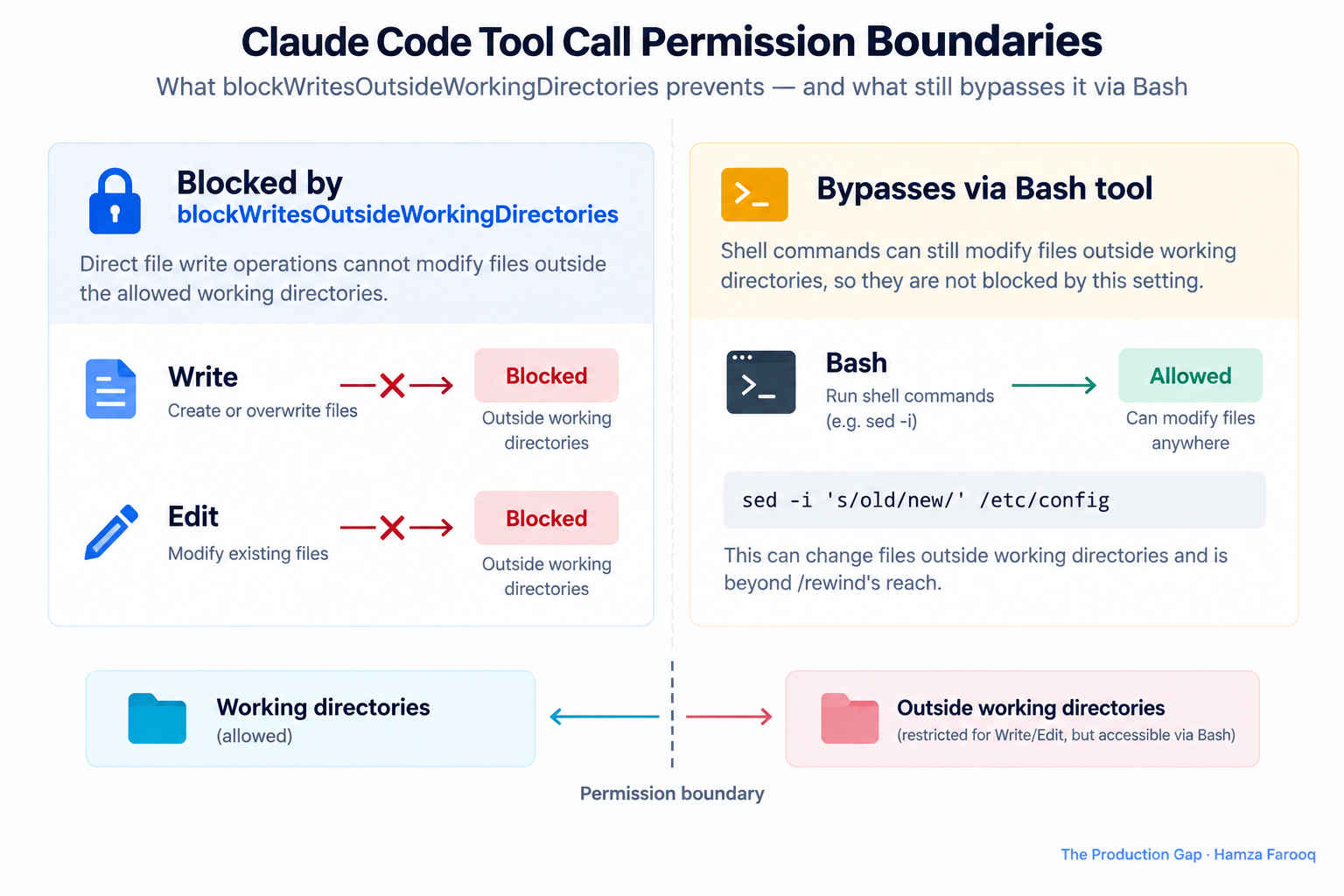
Write creates or overwrites a file. Edit applies targeted patches. NotebookEdit modifies Jupyter notebook cells. Each is a named tool inside Claude's tool-dispatch layer, and the permission system inspects and blocks these calls before they reach the filesystem. This is the complete scope of the setting as understood in this guide.
What the setting does not cover
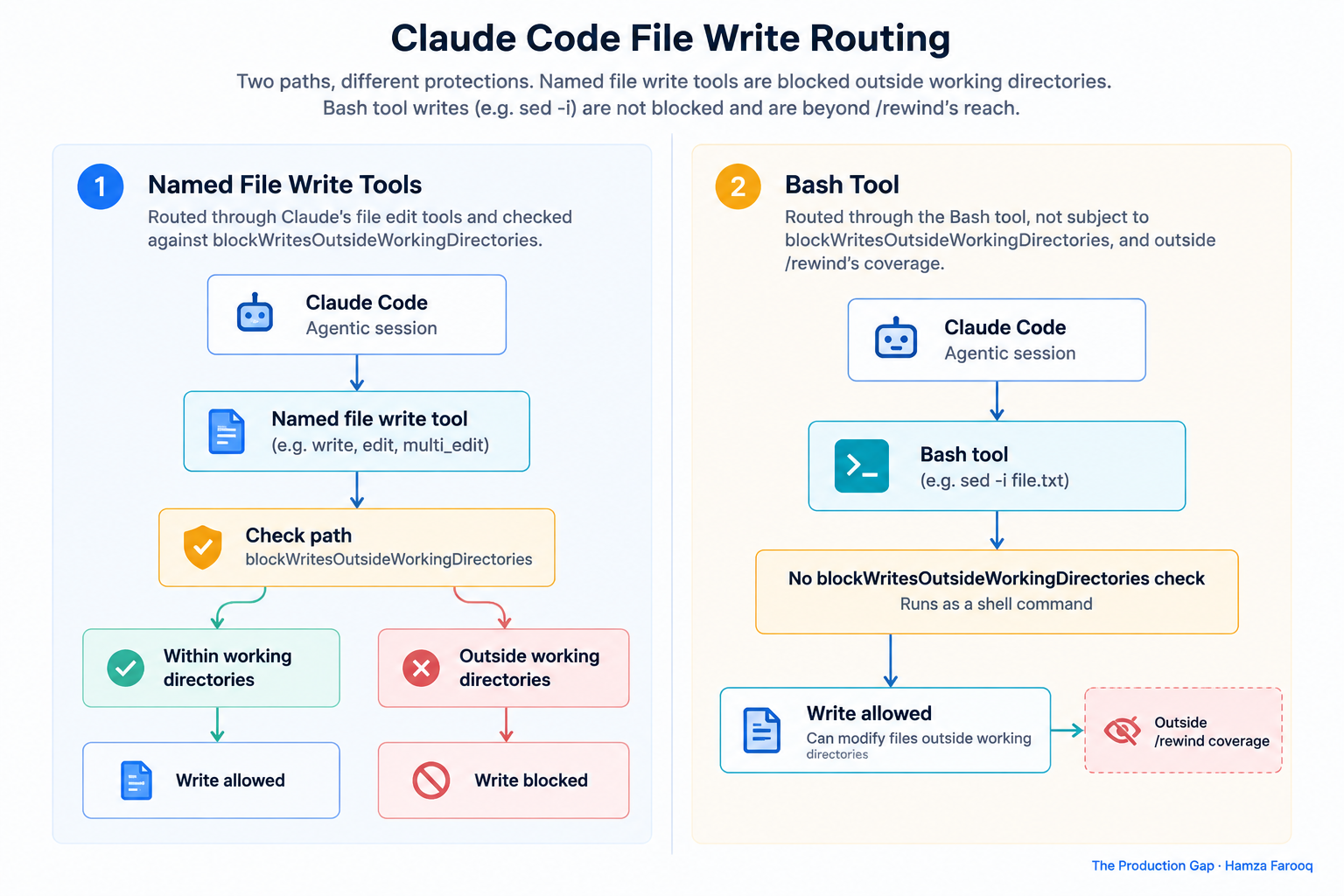
The setting operates at the named-tool layer. When Claude dispatches a Bash command, that command runs as a child process in the host shell, and blockWritesOutsideWorkingDirectories has no visibility into what that process does. A Write call to ../../etc/cron.d/mytask is blocked. A Bash call running echo "..." > ../../etc/cron.d/mytask is not.
| Tool or Command | Blocked by blockWritesOutsideWorkingDirectories? | Recoverable via /rewind? |
|---|---|---|
| Write | Yes | Yes |
| Edit | Yes | Yes |
| NotebookEdit | Yes | Yes |
Bash sed -i | No | No |
Bash echo > file | No | No |
Bash cp | No | No |
Bash mv | No | No |
Bash tee | No | No |
The setting is a precise guard on Claude's named file-write tool-call surface, not a filesystem-level sandbox. Symlink resolution behavior and interaction with specific permission modes should be verified against the live Anthropic changelog before relying on this setting as a hard security boundary.
Why can't /rewind restore files changed by sed -i in Claude Code?
/rewind can only restore files Claude modified through its own named tool calls. sed -i runs as a native shell process that Claude's checkpoint system never observes, making the change invisible to rollback.
What this means for Bash-native commands
Commands including echo > file, cp, mv, tee, awk with output redirection, and perl -pi all bypass Claude's tool surface and fall outside /rewind's coverage. This is a structural property of how the tool boundary is drawn, not a regression or bug. The two layers, prevention and rollback, share the same blind spot: anything that does not flow through Claude's named tools.
How do I audit a Claude Code agentic workflow to find operations outside /rewind's scope?
The two-layer safety model
The permission layer (blockWritesOutsideWorkingDirectories) prevents damage before it happens. The rollback layer (/rewind) recovers from damage that was permitted through named tools. These are complementary, not overlapping. Bash-native writes fall inside neither layer. This two-layer framing is the framework used in this guide and is offered as a practical mental model for workflow design.
Concrete audit steps
- Pull every Bash command from your prompt library or workflow definition.
- Classify each as a tool-surface write (Write, Edit, NotebookEdit) or a shell-native write (anything else that touches files).
- For every shell-native write, verify an external recovery option exists: a Git working tree, a filesystem snapshot, or an explicit pre-command backup step.
Build a two-column inventory: operation on one side, which safety layer covers it on the other. Any blank cell in the second column is an unprotected operation. A clean Git commit before each agentic session is the practical answer for most teams, based on the author's synthesis of the gap described above.
If I enable blockWritesOutsideWorkingDirectories, does it also block Bash commands that write outside the working directory?
No. The setting only constrains Claude's named file-write tools (Write, Edit, NotebookEdit). Bash commands remain unrestricted.
A misconception the setting can create
A team enables the setting, watches Claude get blocked from direct out-of-tree Write calls, and concludes the boundary is secure. Then Claude routes an edit through sed -i and the file changes anyway. The setting creates a tool-call filter, not a filesystem sandbox. That distinction matters operationally and should be communicated to anyone designing safety requirements around this feature.
Frequently asked questions
Can sed -i damage be recovered if I have a Git working tree, even though /rewind doesn't cover it? Yes. If your repository has a clean commit before the session ran, git checkout <file> or git restore recovers shell-native file changes that /rewind cannot touch. This is the recommended fallback for Bash-native operations in agentic workflows.
Does blockWritesOutsideWorkingDirectories affect symlinked paths that resolve outside the working directory? Symlink behavior should be tested in your specific environment and verified against the live Anthropic changelog before relying on this setting as a security boundary. Do not assume symlinks are handled consistently without testing.
What other Bash-native commands besides sed -i are outside /rewind's restoration scope? Any shell command that writes files falls outside /rewind's scope, including echo > file, cp, mv, tee, awk with output redirection, and perl -pi. None are routed through Claude's named file-write tools, so none are recoverable through /rewind.
Conclusion
The permission layer prevents writes through named tools. The rollback layer recovers from what was permitted through those same named tools. Bash-native writes fall into neither zone. Most agentic workflows carry an implicit assumption that /rewind is a universal undo, but as described throughout this guide, it has always been a journal of Claude's own tool calls.
Pull your session prompts, extract every Bash command that touches a file, and confirm an external recovery option exists for each one. The table in the first section is a practical starting point: if an operation has a blank in the recovery column, your workflow needs a Git commit, a snapshot, or an explicit backup step before that command runs. An unconfirmed assumption is not a safety model.
Learn from me

Forward Deployed Engineering Bootcamp for Full-Stack Developers, my Maven cohort. Build and ship complete AI products end to end, from React and Node.js frontends to deployed models with caching and observability. Join the next cohort →
Hire us
Traversaal.ai. We're a team of forward deployed engineers solving the toughest AI problems for Fortune 100 companies: document intelligence, agentic data platforms, and real-time web intelligence, deployed in production. Work with our team to deploy your next agentic ecosystem. Talk to Traversaal.ai →
Join us
Want to solve these problems with us? We're always looking for forward deployed engineers who want to ship production AI. jobs@traversaal.ai
