
TL;DR: Anthropic enabled Claude Code auto mode by default on August 14, 2026, silently removing manual approval prompts for all Pro, Max, and Team plan users. The built-in classifier produces no default audit record of what it approved or blocked. Teams must enable classifier logging, define a tiered tool call policy, and update written permission documentation to restore defensible oversight without sacrificing velocity.
Key Takeaways
- Auto mode is now your default: Claude Code switched to auto mode for all Pro, Max, and Team plan users as of August 14, 2026, whether your team agreed to it or not.
- The classifier is not a human reviewer: Auto mode's built-in tool call classifier blocks risky actions automatically but makes judgment calls a human engineer would approach differently.
- Your old permission settings no longer reflect your choices: Any team that hasn't touched Claude Code configuration since August 2026 is running under a permission model it never consciously approved.
- The audit gap is the real risk: Classifier decisions leave no human-readable trail by default.
- Manual approval mode still exists, use it deliberately: Teams can revert or customize auto mode behavior, but only with an explicit configuration change made now.
Introduction
Anthropic enabled Claude Code auto mode by default in August 2026, silently removing manual approval prompts for all Pro, Max, and Team plan users. Many teams didn't notice until developers stopped seeing permission prompts mid-session. The built-in classifier is partly a safety upgrade, but it also removed the human-readable approval record that engineering managers and security teams had relied on. Most teams are now running under a permission model they never consciously chose.
What exactly changed in August 2026, and what is the classifier actually doing?
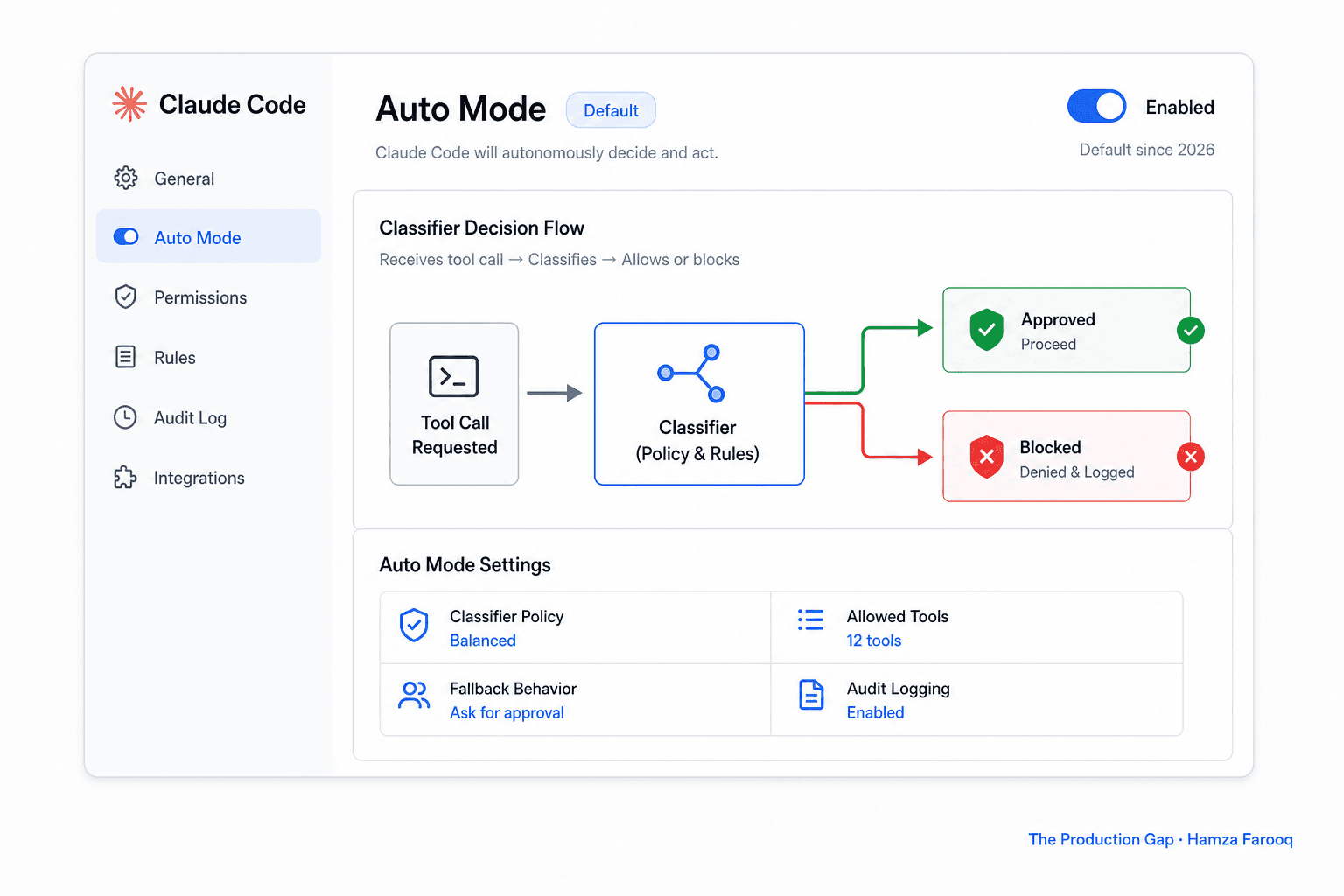
Claude Code auto mode became the default permission layer on August 14, 2026, replacing manual approval prompts with a real-time classifier that independently decides whether each tool call (such as a file write or bash command) is safe to execute without human review.
Before the change, Claude Code interrupted developers with an explicit approval prompt before any significant tool call. Auto mode removes that prompt by routing every tool call through a trained classifier. According to Anthropic's announcement, the classifier blocks anything irreversible, destructive, or dangerous while letting routine operations through silently.
A controlled study of 1,053 paid testers found auto mode blocked 89% of dangerous commands, while human manual approval caught only 13.6%. However, the block rate doesn't tell you whether the commands that pass are the right ones to pass, or whether anyone can see which calls were approved versus blocked silently.
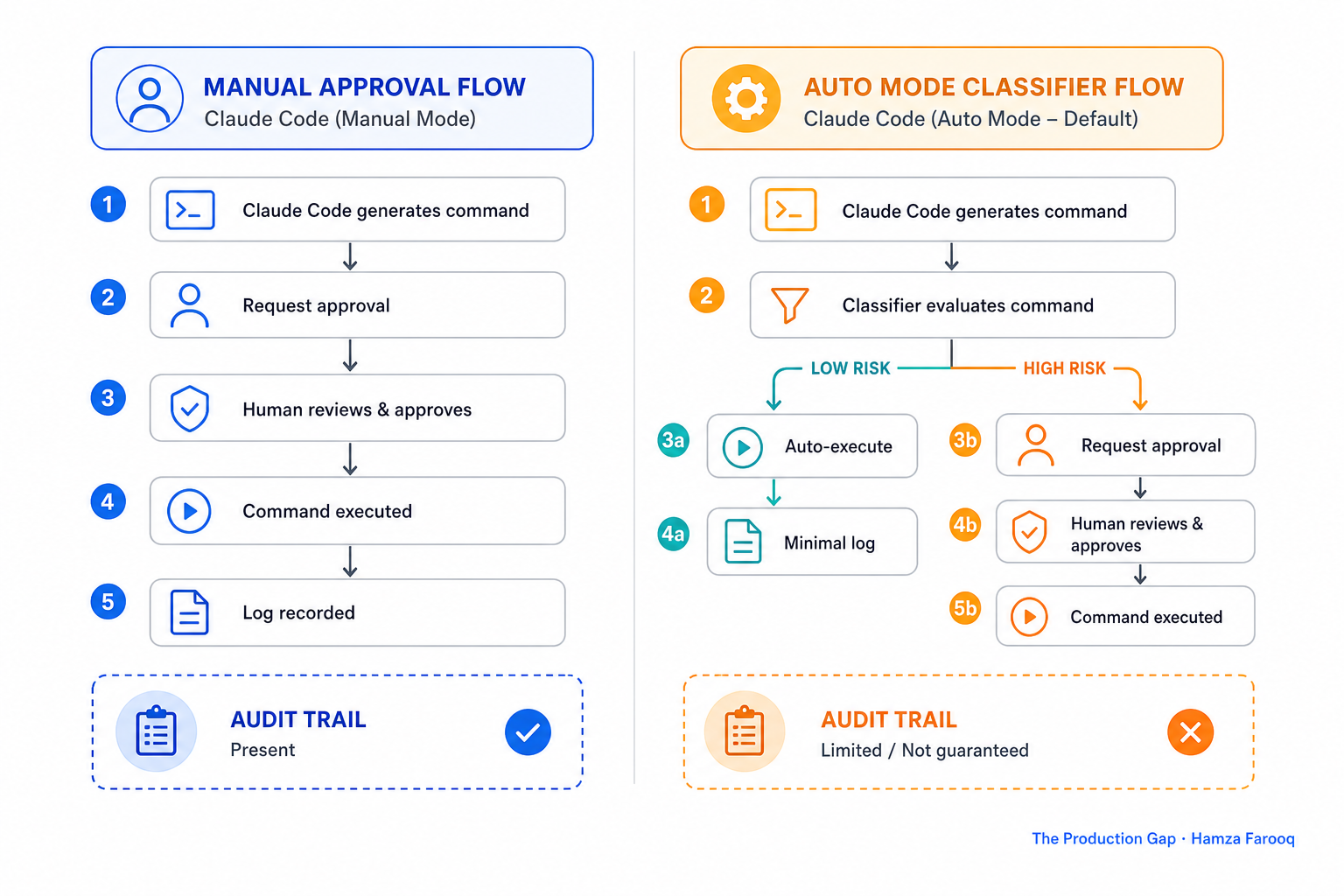
Under manual mode, every high-risk command triggered a prompt a human saw and approved. Under auto mode, the classifier decides, and the team lead reviewing the pull request later has no default record of it.
Auto mode is not a conservative default. It is an autonomous decision-maker operating inside your codebase right now.
Why does the shift to autonomous decisions make auto mode riskier than it first appears?
Auto mode lets Claude Code act on file writes and bash commands across a session without human re-approval at each step, meaning a single poorly scoped instruction can influence significantly more work than a developer anticipates before anyone reviews the outcome.
Previously, each approval prompt created a natural human checkpoint. Auto mode removes it. If a session carries broad or ambiguous instructions, autonomous decisions compound before any human reviews the results.
Table 1: Claude Code Manual Approval vs. Auto Mode
| Dimension | Manual approval mode | Auto mode |
|---|---|---|
| Human decision point | Every significant tool call | Session start only |
| Audit trail per action | Yes | Not by default |
| Blast radius of bad instruction | Limited by prompts | Wider within session |
| Existing policy coverage | Typically addressed | Often not yet updated |
Auto mode turns a session's individual tool calls into a chain of autonomous decisions, and most teams' written permission policies were designed for a world where a human saw each one.
Where is the audit gap, and why does the block rate not resolve the compliance concern?
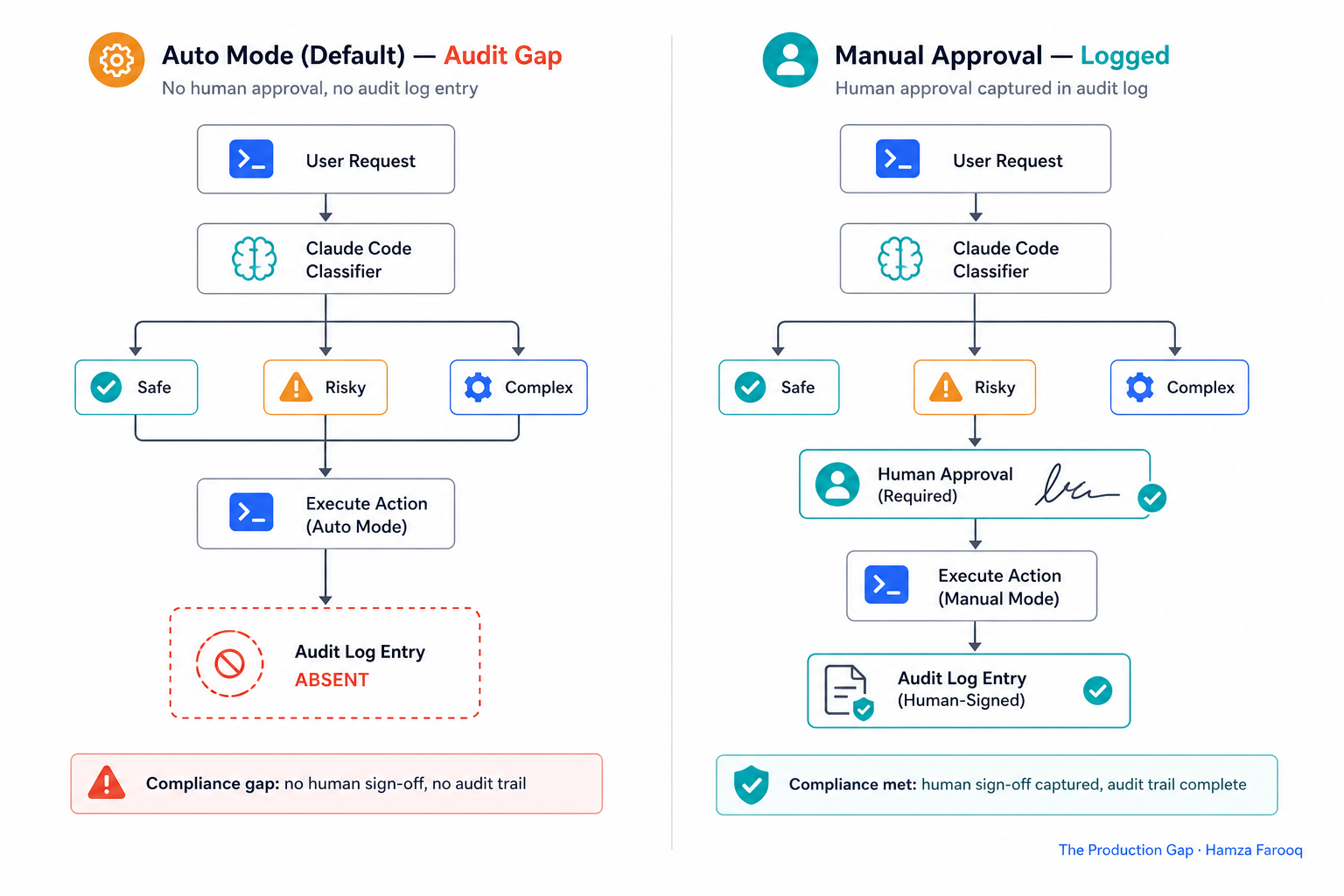
The classifier's block rate is misleading as a complete safety assurance because auto mode produces no human-readable audit record of what it blocked or approved, meaning tool calls that pass do so without any engineer reviewing or recording them.
With manual approval mode, every permission decision generated a human action traceable to a person. Auto mode eliminates that touchpoint. When an incident occurs and your security team asks what commands Claude Code executed autonomously since August, the answer under default configuration is that you don't have a clean record.
Teams subject to change-approval controls for infrastructure modifications will find that classifier decisions don't map to standard control evidence formats without explicit logging configuration, which is not enabled by default.
The compliance problem is not that auto mode is unsafe. It is that its safety decisions are invisible, and invisible decisions do not satisfy audit requirements.
What should your team configure now to restore oversight without breaking developer workflow?
Teams can restore meaningful oversight by combining three targeted configuration changes: enabling classifier decision logging, designating higher-risk commands for mandatory manual approval, and leaving routine file edits in auto mode to preserve velocity.
Step 1: Enable audit logging for classifier decisions. The Claude Code configuration docs document the available logging parameters. This change is non-disruptive and closes the audit gap immediately without altering developer experience.
Step 2: Create a tiered tool call policy.
Table 2: Claude Code Tiered Tool Call Policy
| Tier | Example tool calls | Recommended approval mode |
|---|---|---|
| Low risk | Read file, run tests, lint | Auto mode |
| Medium risk | Write file, install package | Auto mode with logging enabled |
| High risk | Database commands, infrastructure changes | Manual approval required |
Step 3: Update your team's written Claude Code policy document to record that auto mode is now the default and that the tiers above reflect deliberate permission choices. That documentation is what a future auditor or incident review will ask for first.
Oversight does not require reverting to manual mode. It requires making auto mode's decisions visible and human-reviewed at the right risk tiers.
FAQ
Q: Does auto mode keep any log of the commands it blocked or approved autonomously?
No, not by default. Classifier decisions are not surfaced in a queryable format unless logging is explicitly enabled in the Claude Code configuration settings. Teams with change-control requirements should treat this as an immediate gap to close before the next production session runs.
Q: How do I revert my team to manual approval mode, or partially customize auto mode behavior?
You can switch modes or scope approval requirements by category directly in the Claude Code configuration docs. Review those settings before your next production session if you haven't touched configuration since the August 2026 rollout.
Q: What does the classifier block, and how does it make that decision?
The classifier blocks tool calls it categorizes as irreversible, destructive, or dangerous before they execute. It uses a trained model rather than a static rule list, so decisions can diverge from human judgment on edge cases, which is precisely why enabling logging is the first recommended step.
Conclusion
Most engineering teams are running Claude Code auto mode without having made a single conscious choice about it. Anthropic's data shows it catches more dangerous commands than manual human review, but "safer than humans on average" is not the same as "your team has appropriate oversight and a defensible audit record."
The accountability gap is specific: classifier decisions leave no human-readable trail by default, and your existing permission policy was almost certainly written for a world where a human saw every significant tool call. That world changed on August 14, 2026.
Enable classifier decision logging first, it closes the audit gap without touching developer workflow. Then define your tiered tool call policy and update your written documentation to reflect choices you've now made deliberately.
Your next step: Open your Claude Code team configuration today and enable audit logging before your next production session runs.
Learn from me
Claude Code in Practice, my Maven cohort. Master Claude Code from fundamentals to advanced orchestration: skills, subagents, hooks, MCP, and production automation. Join the next cohort →
Hire us
Traversaal.ai. We're a team of forward deployed engineers solving the toughest AI problems for Fortune 100 companies: document intelligence, agentic data platforms, and real-time web intelligence, deployed in production. Work with our team to deploy your next agentic ecosystem. Talk to Traversaal.ai →
Join us
Want to solve these problems with us? We're always looking for forward deployed engineers who want to ship production AI. jobs@traversaal.ai
