
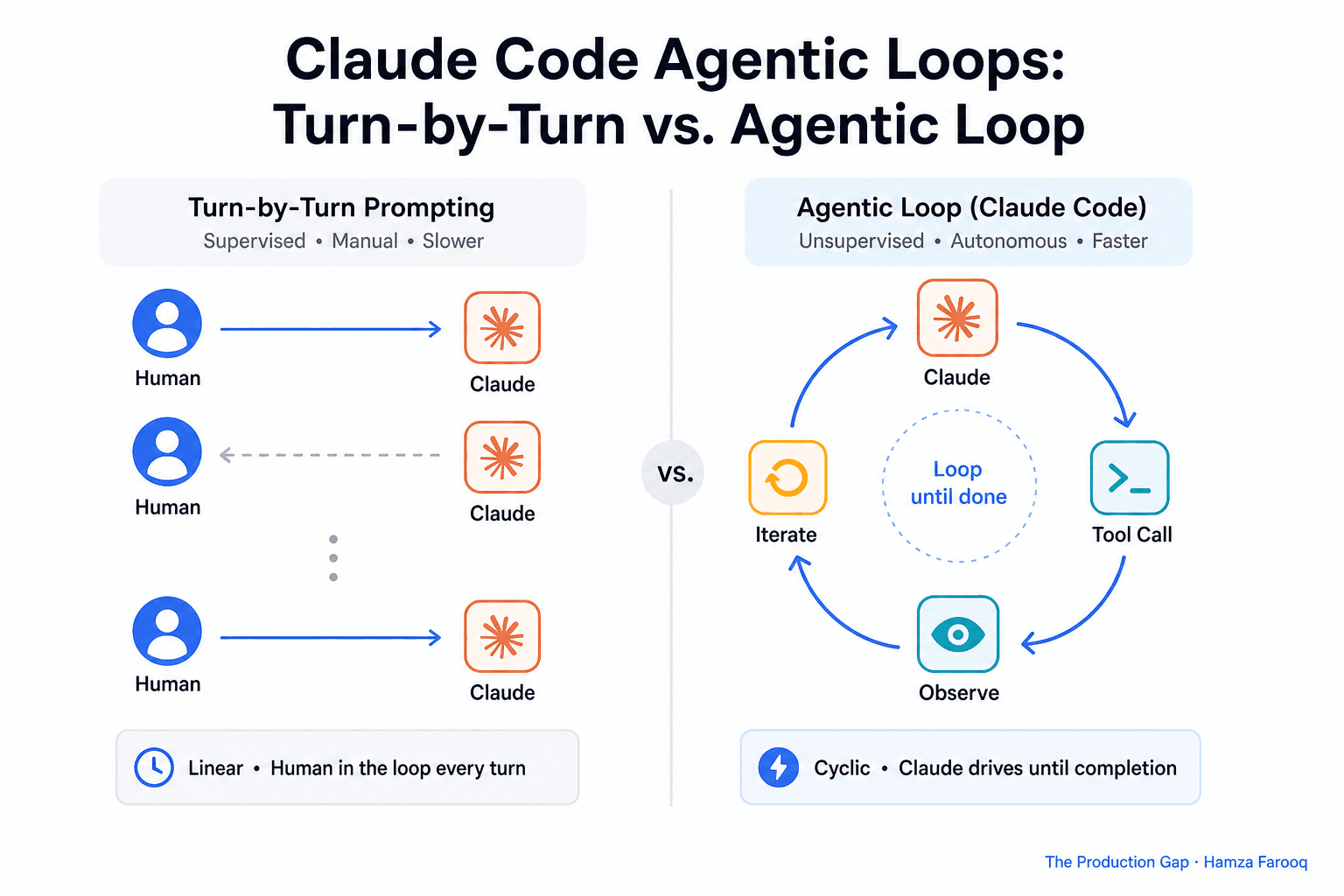
TL;DR: Claude Code agentic loops let an AI agent plan, execute, observe, and iterate through multi-step tasks autonomously until a defined completion condition is met, no human prompt required at each turn. Effective loop engineering means writing precise exit criteria, adding guardrails against runaway execution, and knowing when a simple turn-by-turn interaction still outperforms full autonomy.
Key Takeaways
- Loop engineering changes what you design: build the system that decides when to start, what to do, and when to stop, not a better prompt.
- Completion conditions make or break loops: vague stopping rules cause early exits or infinite loops; conditions must be specific and tool-checkable.
- Guardrails prevent runaway damage: approval checkpoints and step limits stop an agent from making hundreds of bad moves unnoticed.
- Loop types serve different jobs: goal-based, cron, heartbeat, and subagent orchestration; picking the wrong type adds complexity without reliability.
- The Agent SDK embeds loops in your own apps: teams can wire Claude Code's agent loop directly into products rather than relying on the CLI.
- Turn-by-turn prompting still wins sometimes: exploratory, ambiguous, or high-stakes tasks belong with a human in the loop.
Introduction
Developers who have maxed out turn-by-turn prompting need the next level: a system that prompts itself. A badly designed loop does not just waste tokens; it commits, calls APIs, and deletes files before anyone notices. Addy Osmani has named this transition loop engineering, and Lenny's Newsletter has mapped the full loop taxonomy for teams ready to move past manual prompting. This article covers the anatomy, guardrails, loop types, and governance layer that separates reliable automation from after-the-fact blame.
What exactly is loop engineering, and how is it different from prompting Claude Code better?
Loop engineering means replacing yourself as the person who prompts the agent by designing the system that decides when to start, what to do, and when to stop.
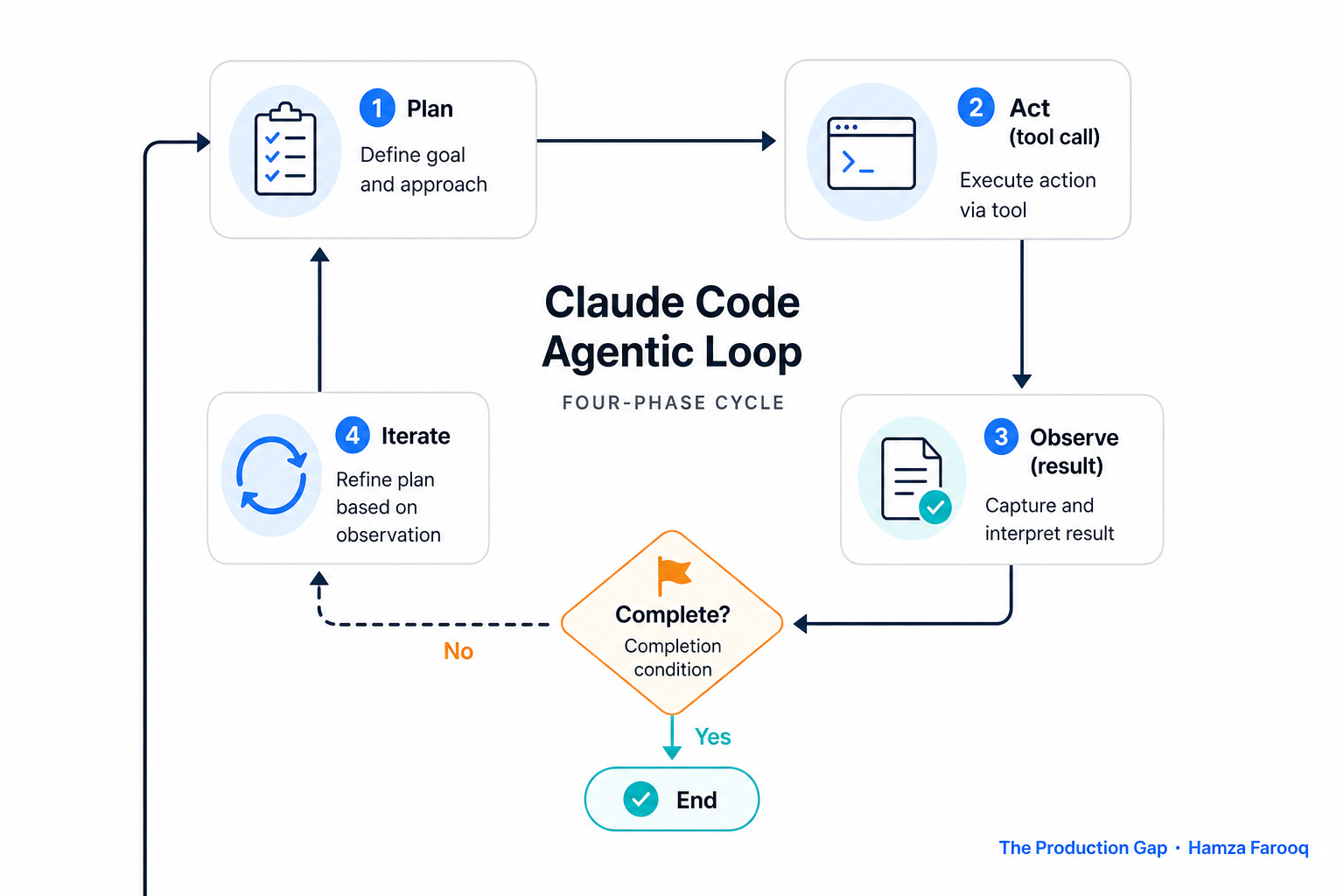
Turn-by-turn prompting keeps you in the decision chain at every step. Loop engineering shifts that: you define the destination, constraints, and exit rules upfront, then the system runs. As a practical framework used in this guide, a Claude Code agent loop runs four phases: plan (decide the next action), act (make a tool call), observe (receive the result), and iterate (continue or stop).
The hidden shift is accountability. A loop transfers decision responsibility to the loop design itself. When an agentic workflow commits code and it breaks, the failure belongs to whoever designed the loop, not the model.
Reader takeaway: Loop engineering is a system design problem, not a prompt quality problem.
How do you write a completion condition Claude Code can actually evaluate?
A completion condition must be specific, measurable, and testable by the agent itself; vague stopping rules cause early exits or infinite loops.
Bad: "Migrate the API." Better, as a practical rule of thumb: define the outcome as a tool-checkable state the agent can verify independently, such as a test suite returning a specific exit code with no schema diff. Replace subjective judgment with something the agent can read from a tool result.
Consider writing a loop contract (a spec defining goal, completion condition, allowed tools, step limit, and escalation path) as the auditable artifact a tech lead reviews before the loop runs. If you cannot write the completion condition in one sentence, the task is not ready for a loop.
Reader takeaway: A loop contract is the artifact your team reviews, not the prompt.
What guardrails prevent a runaway Claude Code loop?
Guardrails keep a multi-step loop from becoming a liability, and combining several types is more reliable than relying on any single one.
Based on the sources reviewed for this guide, the most defensible approach combines approval checkpoints (Claude Code defaults to asking for approval before acting, as Simon Willison documents) with explicit step limits and tool restrictions configured for your specific workflow. As Willison notes, do not disable Claude Code's approval default without a documented exception in your loop contract.
Table 1: Guardrail Types
| Guardrail type | What it prevents |
|---|---|
| Step cap | Infinite iteration on unsolvable tasks |
| Approval checkpoint | Destructive, irreversible actions |
| Tool restriction | Out-of-scope side effects |
Reader takeaway: Layer multiple guardrails; each type covers failure modes the others miss.
What are the four Claude Code loop types, and which one fits your task?
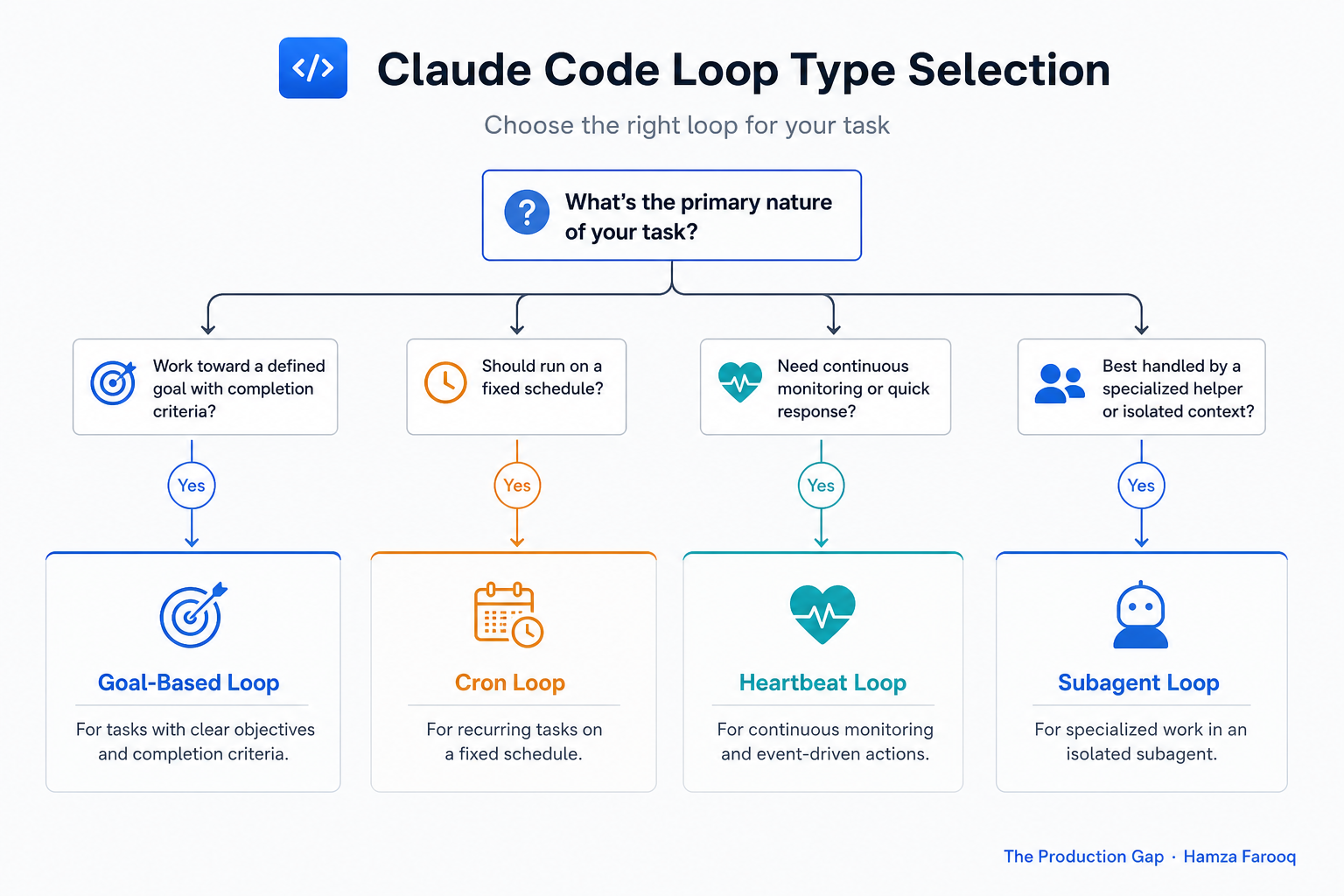
Claude Code agentic loops fall into four types (goal-based, scheduled cron, heartbeat, and subagent orchestration) and using the wrong type creates complexity without reliability gains.
Lenny's Newsletter covers all four as distinct patterns:
Goal-based loops run until a defined outcome is achieved, then stop. Best for one-off automation: migrate a database schema, generate and test a feature branch.
Scheduled (cron) loops run on a time interval via Claude Code's /loop command. Best for recurring tasks such as nightly dependency audits or daily changelog generation. Exit is clock-driven, not outcome-driven.
Heartbeat loops poll a condition until it changes, for example waiting until CI passes before opening a PR. The real risk: polling cost accumulates silently if the condition never fires.
Table 2: Loop-Type Selection Matrix
| Task characteristic | Recommended loop type | Key risk |
|---|---|---|
| Clear outcome, one-time run | Goal-based | Vague completion condition |
| Recurring on a schedule | Cron (/loop) | Drift from stale instructions |
| Waiting for external condition | Heartbeat | Polling cost, missed signals |
| Parallel subtasks, complex workflow | Subagent orchestration | Governance gap per subagent |
Reader takeaway: Match the loop type to the task's exit condition logic, not to what sounds most sophisticated.
When is turn-by-turn prompting still the right tool?
Do not build a loop for tasks where the goal might change mid-stream, for irreversible production operations without a rollback path, or for tasks requiring judgment that cannot be encoded as a checkable condition. As a practical rule of thumb used in this guide: if you cannot write a completion condition in one sentence, the task is not ready for a loop.
Reader takeaway: Autonomy is not always an upgrade; the right tool depends on whether the exit condition is knowable in advance.
How do you embed a Claude Code agent loop in your own application?
The Claude Code Agent SDK lets you embed the autonomous loop directly in any application so Claude evaluates a prompt, calls tools, receives results, and iterates without CLI interaction.
Temporal's AI cookbook documents a production pattern using dynamic Activities to keep the agent loosely coupled from specific tools, so tooling can change without rewriting loop logic. Start with the SDK's minimal loop, add guardrails incrementally, and write the loop contract before writing any code.
Reader takeaway: The Agent SDK makes embedding straightforward; the loop contract makes it safe.
Frequently Asked Questions
How do I write a completion condition that Claude Code can reliably evaluate? Define it as a tool-checkable state: "all unit tests pass with exit code 0" is valid; "the code looks clean" is not. If verification requires human interpretation, it is not a valid condition for an autonomous loop.
What stops a Claude Code agentic loop from running indefinitely or taking destructive actions? Use multiple guardrails together (step caps, approval checkpoints, and tool restriction allowlists) because any single guardrail leaves meaningful failure modes uncovered.
How is a goal-based loop different from a scheduled cron loop in Claude Code? A goal-based loop exits when a defined outcome is reached; a cron loop runs on a fixed time interval via the /loop command regardless of outcome. Use goal-based for one-off automation, cron for recurring maintenance where schedule matters more than end state.
Can I embed Claude Code's agent loop in my own application, and how does the Agent SDK work? Yes, the Claude Code Agent SDK lets Claude evaluate prompts, call tools, receive results, and iterate without CLI interaction. Temporal's integration pattern keeps tools loosely coupled via dynamic Activities so tooling can change without rewriting loop logic.
Conclusion
Loop engineering is not about better prompts. It is about designing a system that prompts itself, and owning everything it does while unsupervised. When a runaway loop deletes files or fires hundreds of bad API calls, the reflex is to call it an AI problem. Usually it is a missing loop contract.
Start with the Claude Code Agent SDK's minimal loop example, write your first loop contract, and run it sandboxed before touching production.
Learn from me
Claude Code in Practice, my Maven cohort. Master Claude Code from fundamentals to advanced orchestration: skills, subagents, hooks, MCP, and production automation. Join the next cohort →
Hire us
Traversaal.ai. We're a team of forward deployed engineers solving the toughest AI problems for Fortune 100 companies: document intelligence, agentic data platforms, and real-time web intelligence, deployed in production. Work with our team to deploy your next agentic ecosystem. Talk to Traversaal.ai →
Join us
Want to solve these problems with us? We're always looking for forward deployed engineers who want to ship production AI. jobs@traversaal.ai
