
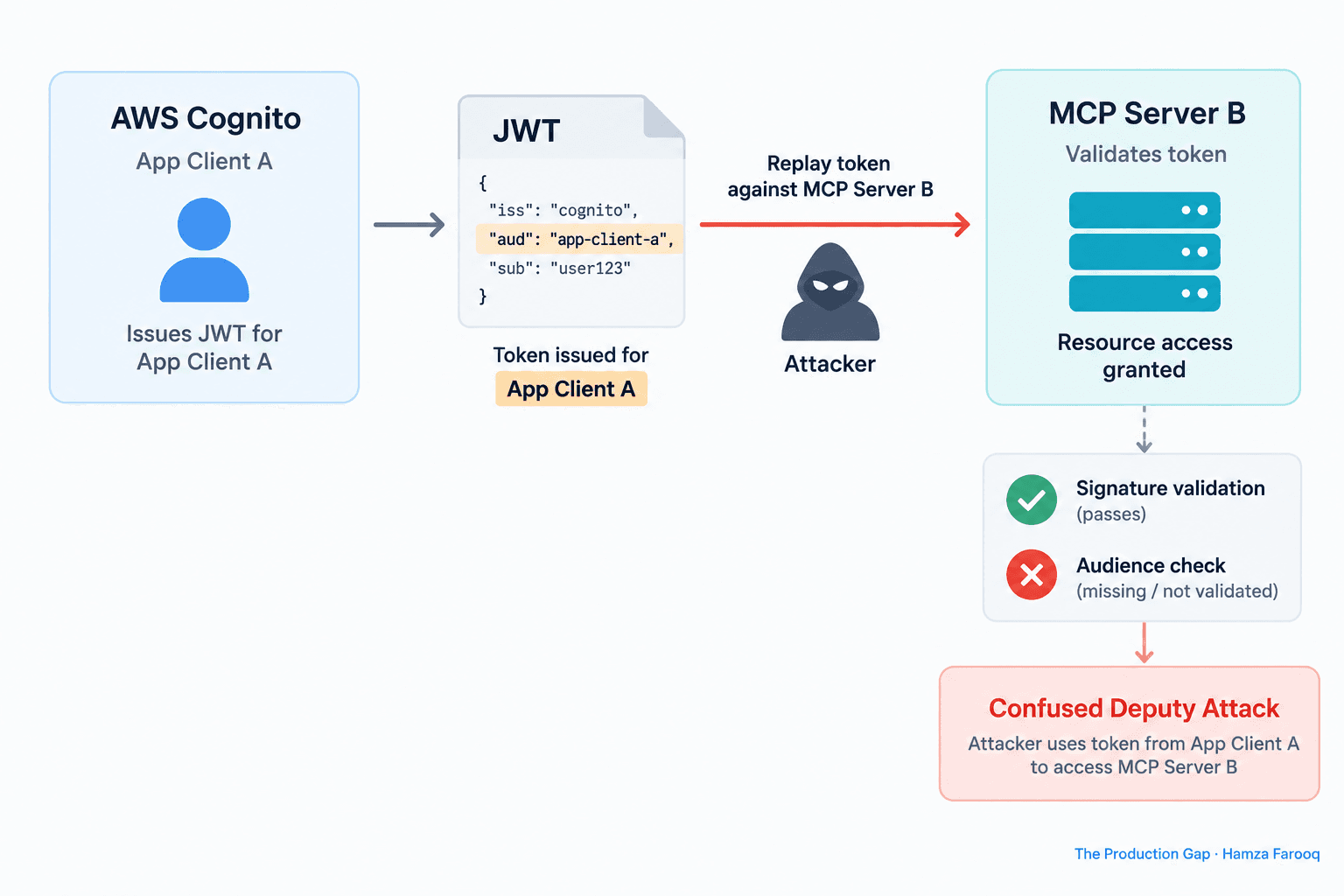
TL;DR: GHSA-4prq-p2x5-w9fh is a missing OAuth audience check in AWS API MCP Server versions 1.3.0–1.5.x that allows a valid token issued for one Cognito app client to authenticate against a different MCP server. The server verified signature and expiry but never validated theaudclaim. Version 1.6.0 ships the fix, but it only activates whenexpected_audienceis explicitly configured. Test your server by presenting a mismatched token and confirming you receive a 401.
Key Takeaways
- Audience claim is the missing lock: Versions 1.3.0–1.5.x verified signature and expiry but never checked who the token was issued for.
- Confused deputy is the real attack shape: A valid token minted for one Cognito app client replays cleanly against a different MCP server.
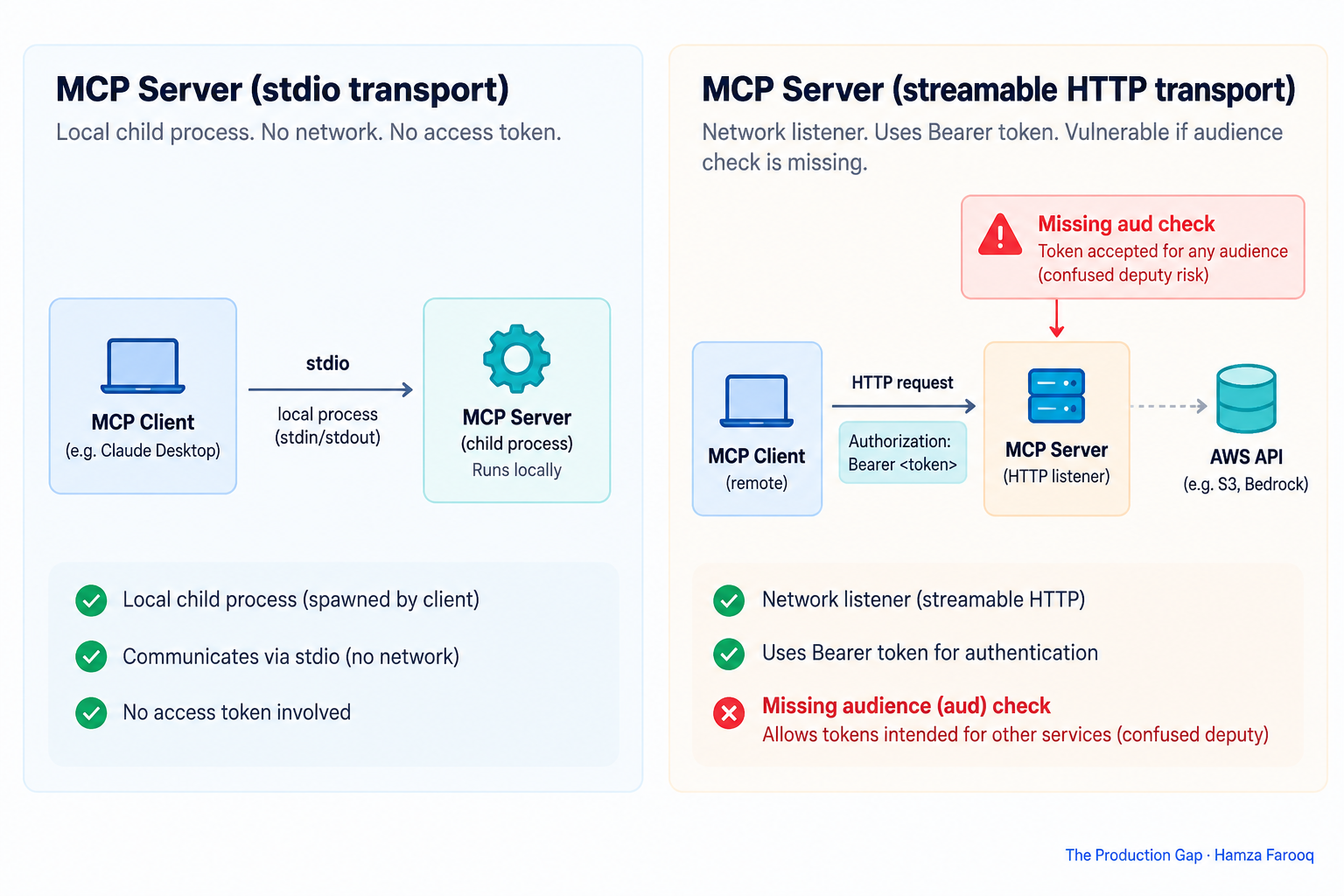
- Transport determines exposure: stdio is unaffected; only streamable-HTTP deployments are in the vulnerable path.
- A version bump alone does not close the hole: 1.6.0 ships the fix, but it only activates when
expected_audienceis explicitly set in configuration. - Test with a mismatched token: Send a valid JWT scoped to a different app client; if the server accepts it, you are still vulnerable.
- This is separate from the SDK OAuth bug: Patching the MCP Python SDK credential theft issue does not cover this advisory.
Introduction
GHSA-4prq-p2x5-w9fh is a missing OAuth audience check in AWS API MCP Server versions 1.3.0–1.5.x that allows a valid token issued for one Cognito app client to authenticate against a different MCP server, because the server never verifies the token's aud claim matches its own expected value. The advisory is documented in CVE-2026-115413 and tracked on the awslabs/mcp security advisories page.
Why does a valid JWT from one Cognito app client grant access to a completely different MCP server?
In AWS API MCP Server versions 1.3.0–1.5.x, a JWT was accepted as long as its signature and expiry were valid; the server never verified whether the token was issued specifically for that server. Any unexpired Cognito token from the same user pool could impersonate a legitimate caller.
Signature verification confirms authenticity. Expiry confirms the token is still live. The audience claim, the aud field, confirms the token was issued specifically for the receiving service. The vulnerable versions validated the first two and skipped the third.
The confused deputy attack follows directly. An attacker holds a valid token from Cognito App Client A (for example, a low-privilege analytics service) and replays it against the MCP server registered as App Client B. The signature check passes, the expiry check passes, no aud check runs, and access is granted. The server then acts on the attacker's behalf using its own configured AWS credentials. No forgery is required, only token misuse. As CVE-2026-115413 scopes it: "local users running AWS operations with the server's configured AWS credentials using an access token not intended for that server."
Why is stdio transport unaffected, and what does that mean for your threat model?
The stdio transport communicates through standard input/output rather than a network socket, so the audience vulnerability exists only in the streamable-HTTP transport path, where tokens arrive as Bearer credentials in HTTP Authorization headers.
Stdio-mode servers run as a child process with no HTTP listener and no JWT validation at all. Streamable-HTTP opens a persistent endpoint that receives Bearer tokens on every request; that is where the audience check was missing. The first audit question is not "what version am I running?" but "which transport am I using?"
Table 1: Transport Mode Risk Comparison
| Dimension | stdio transport | Streamable-HTTP transport |
|---|---|---|
| Network exposure | None, local IPC only | Exposed HTTP endpoint |
| JWT validation occurs | No | Yes |
| Audience check missing (1.3.0–1.5.x) | N/A | Vulnerable |
| Confused deputy risk | None | Active |
| Fix required | None | Upgrade and set expected_audience |
Does upgrading to 1.6.0 actually fix this, or is there a configuration step you still have to take?
Upgrading to version 1.6.0 ships the audience validation code but does not activate it automatically. You must explicitly set expected_audience to your MCP server's Cognito app client ID; leaving it blank preserves the pre-patch behavior even on the patched version.
Consult the awslabs/mcp releases page for the changelog entry confirming the expected_audience parameter introduction in 1.6.0.
What operators must do, in order:
- Upgrade to 1.6.0.
- Set
expected_audienceto your MCP server's Cognito app client ID. - Verify the fix is active by running the mismatched-token test described in the next section.
How do you confirm whether your MCP server actually rejects a mismatched token right now?
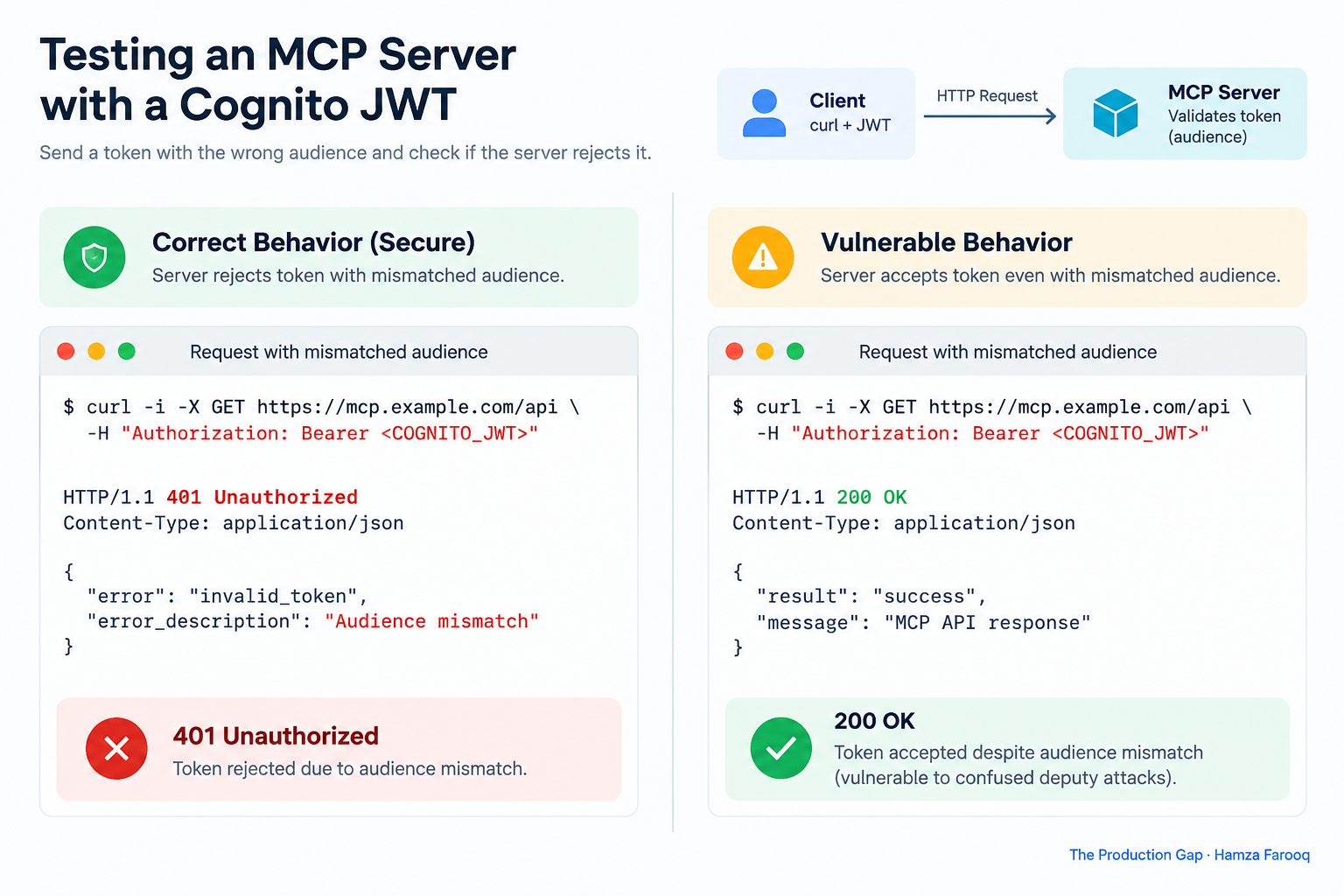
Generate a valid JWT from a different Cognito app client that shares the same user pool, send it as a Bearer token to your streamable-HTTP endpoint, and confirm you receive a 401. A 200 response means audience validation is not enforced, regardless of which version you are running.
Step-by-step test procedure (a practical rule of thumb from this guide's author):
- Identify two Cognito app clients in the same user pool: your MCP server's intended client (Client A) and any other client you control (Client B).
- Authenticate against Client B to obtain a valid, signed, unexpired access token with Client B's ID in the
audclaim. - Inspect the token to confirm the audience value. Run the following, replacing
<token>with the raw JWT string:
python3 -c "import jwt; print(jwt.decode('<token>', options={'verify_signature': False}))"
Confirm that aud shows Client B's app client ID, not your MCP server's.
- Send the mismatched token to your MCP server's streamable-HTTP endpoint. Replace
<client-b-token>with the token from step 2 and<your-mcp-server-url>with your server's full endpoint URL:
curl -H "Authorization: Bearer <client-b-token>" https://<your-mcp-server-url>/
- Evaluate the response: A
401with an audience mismatch message means validation is working correctly. Any200response or successful tool execution means the server is still vulnerable.
Frequently Asked Questions
Does upgrading to 1.6.0 alone fix GHSA-4prq-p2x5-w9fh, or do I also need to change my configuration?
Upgrading is necessary but not sufficient. The fix only activates when expected_audience is explicitly set in configuration. A version bump without that setting preserves the vulnerable behavior.
What is the difference between GHSA-4prq-p2x5-w9fh and the MCP Python SDK OAuth credential theft vulnerability?
They are distinct vulnerabilities in different codebases. GHSA-4prq-p2x5-w9fh is a missing audience check in the API MCP server's token validation logic. The MCP Python SDK flaw exposes OAuth credentials during the authorization flow itself. Both require independent remediation.
What Cognito configuration changes reduce blast radius if audience validation is not enforced at the server layer?
Restrict each app client to the minimum required OAuth scopes and avoid sharing user pools across services with different trust levels. Enabling resource server audience restrictions at the Cognito level adds a second layer of defense but does not substitute for server-side aud validation.
Conclusion
The awslabs team shipped a fix quickly. The deeper problem is that the JWT library ecosystem hands every MCP developer a tool with audience checking disabled by default, and nothing in the framework prompts them to turn it on.
The audience claim is not an advanced JWT feature. It is the part of the token that says who the token is actually for. Skipping it is like verifying the signature on a check without reading the payee line.
Run the mismatched-token test against your MCP server, set expected_audience if you have not already, then check every other MCP server in your fleet. The test takes five minutes; the gap it closes is real.
Learn from me
Forward Deployed Engineering Bootcamp for Full-Stack Developers, my Maven cohort. Build and ship complete AI products end to end, from React and Node.js frontends to deployed models with caching and observability. Join the next cohort →
Hire us
Traversaal.ai. We're a team of forward deployed engineers solving the toughest AI problems for Fortune 100 companies: document intelligence, agentic data platforms, and real-time web intelligence, deployed in production. Work with our team to deploy your next agentic ecosystem. Talk to Traversaal.ai →
Join us
Want to solve these problems with us? We're always looking for forward deployed engineers who want to ship production AI. jobs@traversaal.ai
