
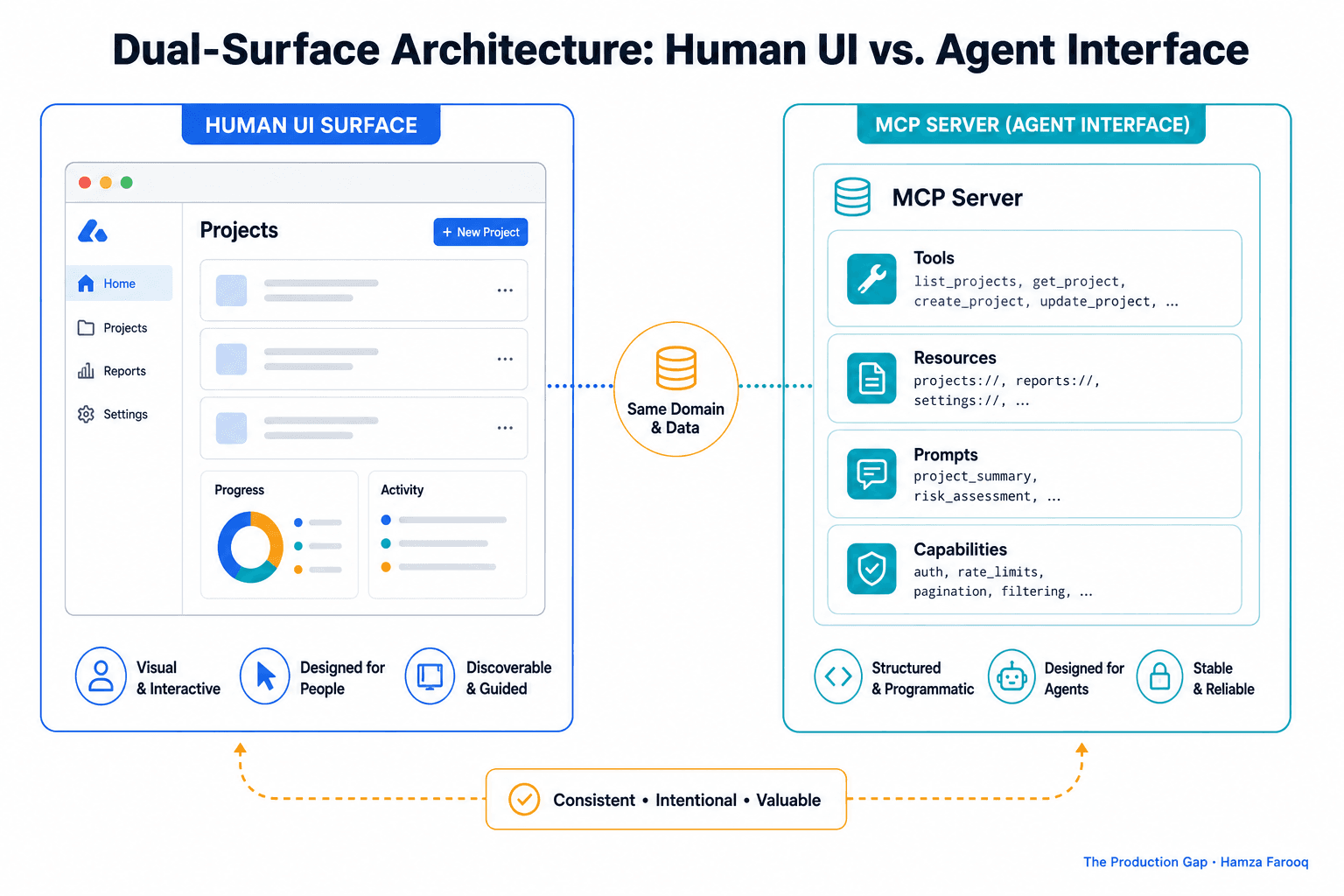
TL;DR: Agent experience design is the practice of building product surfaces, tools, and APIs that AI agents can reliably discover, authenticate against, and recover from errors within, without any human rendering a UI. Product managers treat it as a first-class discipline by designing explicit tool schemas, agent-readable descriptions, scoped auth flows, and instrumentation that captures non-human usage patterns. This guide presents a practitioner framework for doing that work.
Key Takeaways
- Dual-surface architecture deserves its own roadmap: Products benefit from a parallel, agent-accessible interface alongside the human UI.
- Tool discoverability drives agent success: How you name and organize tools is a product decision with direct performance consequences.
- Tool descriptions are product copy: Vague descriptions produce bad outcomes the same way a broken button does.
- Agent auth requires its own pattern: Standard login flows break when the "user" is software running unattended.
- Error recovery must be self-service: Error messages must give agents enough signal to self-correct without human help.
- Observability metrics must change for agents: Teams need tool call success rates and retry frequency, not clicks and sessions.
What Is Agent Experience Design (AX)?
Agent experience design is the practice of optimizing a digital product so AI agents can access, understand, and operate within it to achieve user-defined goals, without any human rendering a UI. It is analogous to UX, but for non-human callers.
Should You Build a Separate Agent Interface, or Extend Your Existing UI?
Agents need their own surface. Extending your human UI for agent access is roughly the same mistake as designing an interface without accessibility in mind and then patching it for screen readers later.
A human UI is built for visual parsing and click navigation. An MCP server exposes capabilities as discrete, callable tools with named schemas. Treating them as the same surface produces brittle integrations that fail silently.
The core difference between a human UI and an MCP server is the navigation model: one is visual and click-based, the other is schema-driven and tool-callable. The following table, the Human UI vs. MCP Server Surface Comparison, summarizes the full set of structural differences a PM needs to account for when deciding whether to extend or build separately.
Human UI vs. MCP Server Surface Comparison
| Dimension | Human UI | MCP Server |
|---|---|---|
| Navigation model | Visual, click-based | Tool call, schema-driven |
| Discoverability | Layout and labels | Tool name and description |
| Auth pattern | Session cookie or OAuth login | API key or M2M OAuth token |
| Error handling | Visual feedback | Structured error payload |
| Versioning unit | Page or component | Tool schema or endpoint |
AX surface triage
Use the following questions, drawn from the framework used in this guide, to decide whether a separate agent surface is warranted:
- Does your product's value live in data retrieval, action execution, or workflow coordination? (Yes: MCP server candidate)
- Would an agent need to parse visual layout to complete a task? (Yes: separate surface required)
- Is your team prepared to version and QA a schema independently of the UI release cycle? (No: solve ownership before shipping)
A stale schema misleads agents and corrupts downstream integrations. Shipping one you cannot maintain is worse than shipping nothing.
How Does the CPAR Framework Improve Tool Descriptions?
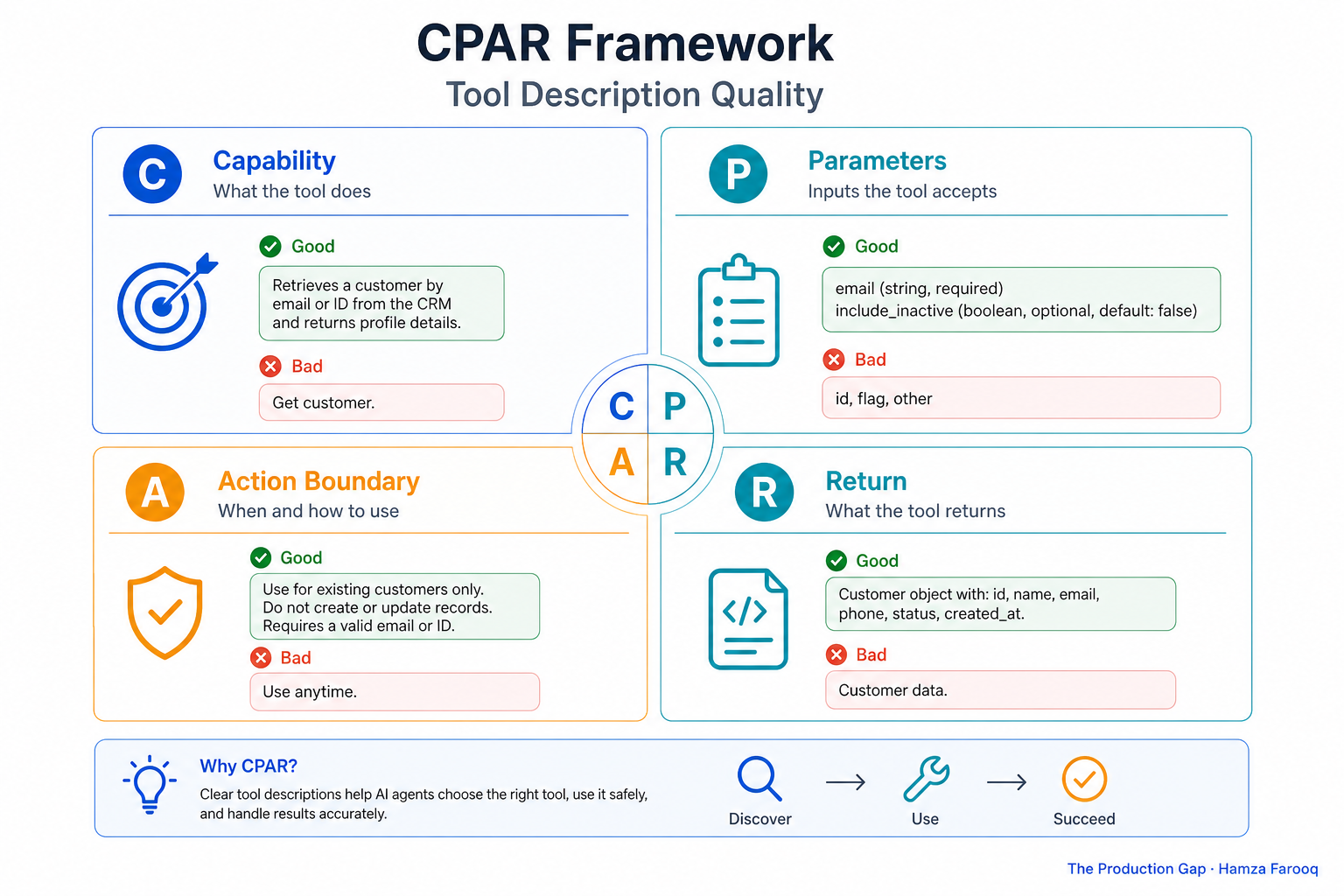
The CPAR framework improves tool descriptions by forcing each one to answer the four questions an agent must resolve before it can call a tool correctly: what the tool does, what inputs it requires, what it does not do, and what the caller gets back.
Tool descriptions are the functional core of agentic UX. An agent reads a description and decides whether this is the right tool, what parameters to pass, and what comes back. Weak answers produce failed tasks, and those failures compound across every downstream workflow that touches your product. A tool description is the instruction set an agent reasons from: a vague one produces wrong calls the same way a broken button produces user error.
The CPAR Framework for Tool Descriptions
Every tool description should pass the CPAR test:
- Capability: What does this tool do in one precise sentence?
- Parameters: What inputs does it require, and what constraints apply?
- Action boundary: What does this tool not do?
- Return: What does the agent get back, and in what shape?
Omit any of the four and the agent guesses. In the author's experience, tool descriptions require their own roadmap, versioning, and QA cycle. Ownership of this work should be explicit on the team before an MCP server ships.
What Authentication and Error Recovery Patterns Does an Agent-Accessible Product Need?
When the caller is software running unattended, every auth and error pattern designed for a human breaks. Agents need machine-to-machine auth and self-correcting error messages.
Agent authentication
Standard OAuth flows require a redirect, a browser, and a human to click "Authorize." Agents have none of those. The right pattern is machine-to-machine (M2M) OAuth, a client credentials grant that issues a token directly, or scoped API keys with explicit permission surfaces. Least-privilege scoping matters here: the author recommends defining your permission model before you ship, not after an incident surfaces the gap.
Error recovery
A 500: Internal Server Error is a dead end for an agent. Every error state should answer three questions: what went wrong, why it went wrong, and what to try instead. A structured error with a code, a plain-language explanation, and a suggested recovery action gives an agent a path forward. No human is watching it fail, so the error payload must carry enough signal for self-correction.
How Do You Measure Agent Experience Quality When Agents Never Load Your UI?
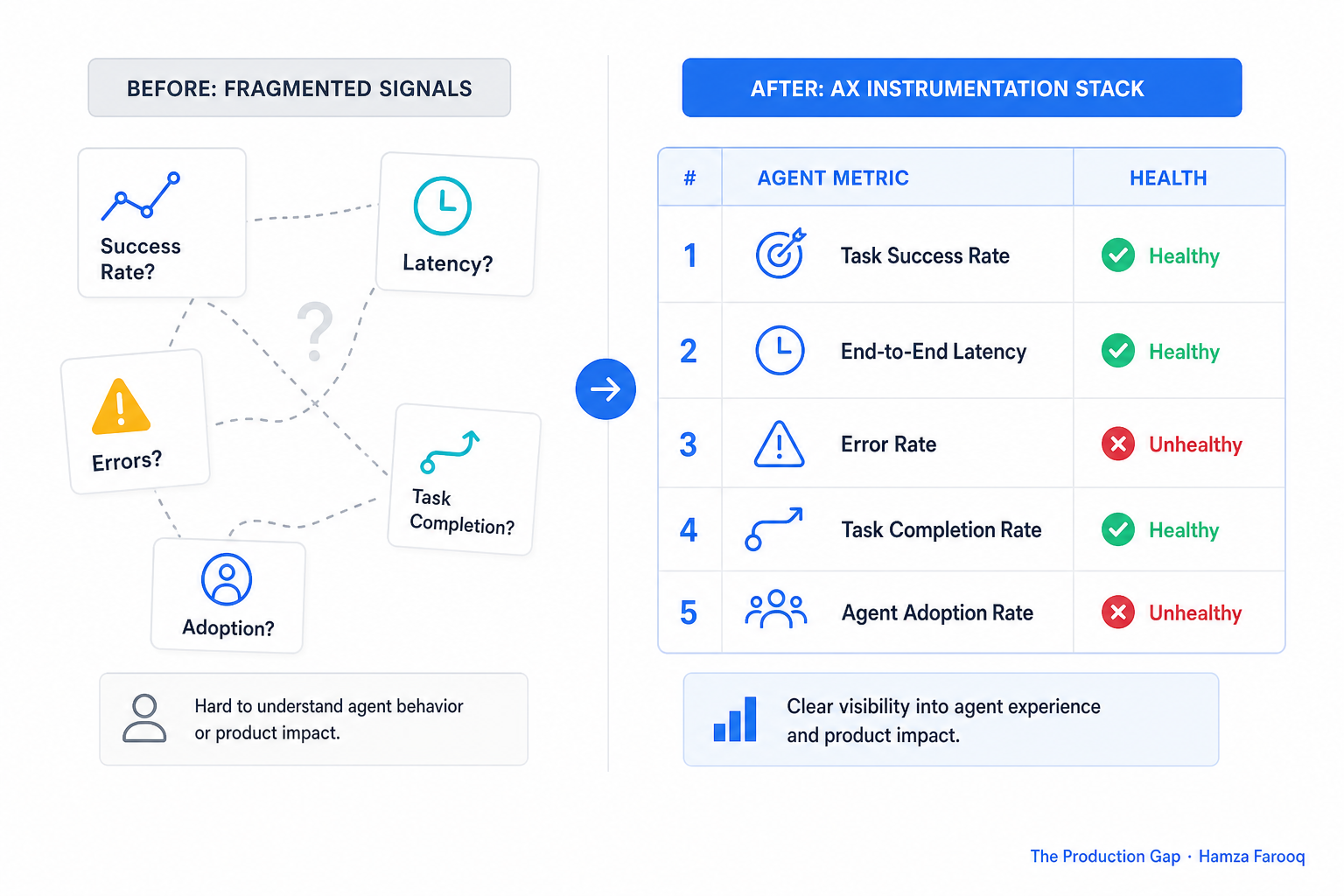
When your user never opens a browser, clicks and page views become meaningless. AX quality is better tracked through tool call success rates, retry frequency, and task completion at the API layer.
AX Observability Framework
The following table presents what the author considers a practical starting point for AX observability, as of mid-2025. These metrics are practitioner synthesis, not ratified industry standards, but they map directly to the questions worth answering about whether your agent surface is working.
| Metric | What it measures | Why it matters |
|---|---|---|
| Tool call success rate | Percentage of calls returning a valid response | Primary AX health signal |
| Retry frequency | How often an agent retries the same tool | May signal ambiguous descriptions or brittle schemas |
| Time-to-first-useful-call | How long before an agent finds the right tool | Measures discoverability |
| Error type distribution | Which error codes dominate | Directs description and schema QA |
| Task completion rate | Did the agent achieve the end goal? | Ultimate AX outcome metric |
As a practical rule of thumb, high retry frequency on a specific tool warrants a close look at that tool's description before investigating infrastructure. Teams that reuse human analytics infrastructure risk missing whether their agent surface is working at all.
Frequently Asked Questions
What is agent experience design? Agent experience design is the practice of optimizing a digital product so AI agents can access, understand, and operate within it to achieve user-defined goals. Salesforce frames it as optimizing digital environments so agents can interact with your business and generate valuable outcomes .
Should I build an MCP server if my SaaS product already has a REST API? An existing REST API is a starting point, not a substitute. A raw endpoint without descriptions gives an agent no signal about what it does or when to use it. The description layer is what makes a capability agent-accessible, and that layer requires its own design and maintenance work.
How do I write tool descriptions that improve agent task success rates? Apply the CPAR framework: Capability in one sentence, required Parameters and constraints, Action boundary covering what the tool does not do, and Return shape. Omit any of the four and the agent guesses wrong.
How do I measure whether my agent experience is working? Track tool call success rate, retry frequency, time-to-first-useful-call, error type distribution, and task completion rate at the API layer. These are practitioner starting points from the AX Observability Framework in this guide. Adapt them to your product's specific failure modes.
Conclusion
Every PM org right now has someone who owns the human UI. Ownership of the agent surface is far less common, and that gap is where integration opportunities are won or lost.
Your tool descriptions and MCP schema are functional infrastructure, not documentation to fill in at the end of a sprint. Treat the CPAR framework and the AX Observability Framework above as working tools to iterate on, not finished specifications.
Your next step: Audit every tool description in your current MCP server against CPAR. Any tool that fails is your first AX roadmap item.
The agent that cannot understand your tools will use a competitor's instead
Learn from me
Agentic AI for Product Managers, my Maven cohort. Learn how to design, evaluate, and ship reliable AI systems: the technical fluency PMs need to lead agentic products, no engineering background required. Join the next cohort →
Hire us
Traversaal.ai. We're a team of forward deployed engineers solving the toughest AI problems for Fortune 100 companies: document intelligence, agentic data platforms, and real-time web intelligence, deployed in production. Work with our team to deploy your next agentic ecosystem. Talk to Traversaal.ai →
Join us
Want to solve these problems with us? We're always looking for forward deployed engineers who want to ship production AI. jobs@traversaal.ai
